

In the rapidly evolving world of artificial intelligence, Higgsfield AI has emerged as a standout platform that empowers creators to produce stunning images and videos with remarkable speed and exceptional quality. This innovative tool leverages advanced AI models to transform simple text prompts or static images into dynamic, cinematic-quality content. Whether you’re a content creator, marketer, or enthusiast exploring creative possibilities, mastering how to use Higgsfield AI opens up endless opportunities for producing professional-grade visuals without requiring extensive editing skills or expensive software.
An In-Depth Introduction to Higgsfield AI
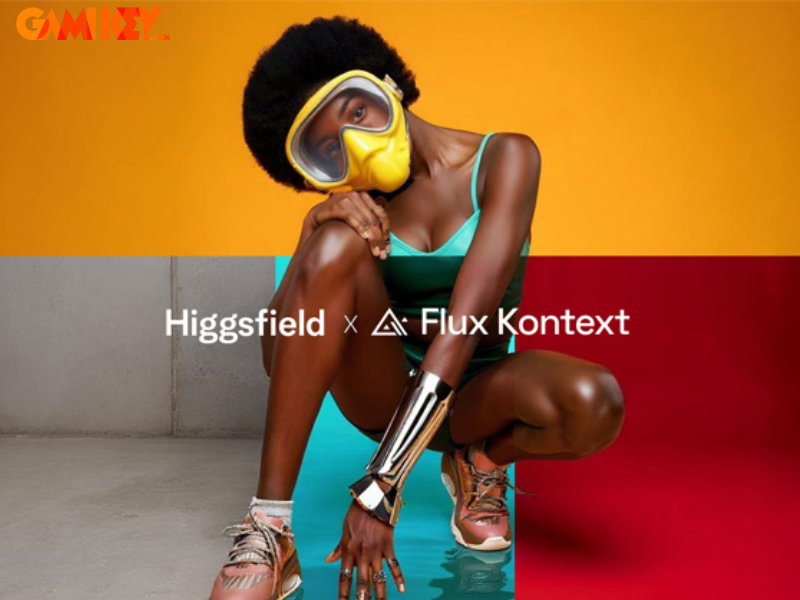
Higgsfield AI represents a cutting-edge AI-driven platform specifically designed for generating high-quality videos and images. At its core, the technology excels at converting textual descriptions or still photographs into fluid, engaging video sequences that exhibit professional cinematic characteristics. Accessible via both web browsers and dedicated mobile applications on iOS and Android devices, it ensures seamless usability across different environments.
What sets Higgsfield AI apart is its commitment to accessibility and efficiency. Users from diverse backgrounds—ranging from novice hobbyists to seasoned professionals in content production and digital marketing—can harness its power without prior experience in video editing or graphic design. The platform’s intuitive design and robust processing capabilities make it an indispensable tool for anyone seeking to materialize creative concepts quickly and effectively.
By democratizing advanced AI features, Higgsfield AI bridges the gap between imagination and realization, allowing ideas to flourish into visually captivating stories. Its rapid generation times and consistent output quality have positioned it as a preferred choice in the competitive landscape of AI content creation tools.
Exploring the Standout Features of Higgsfield AI
The true strength of Higgsfield AI lies in its comprehensive suite of features that cater to a wide array of creative needs. These capabilities not only accelerate the production process but also elevate the final results to standards typically associated with professional filmmaking.
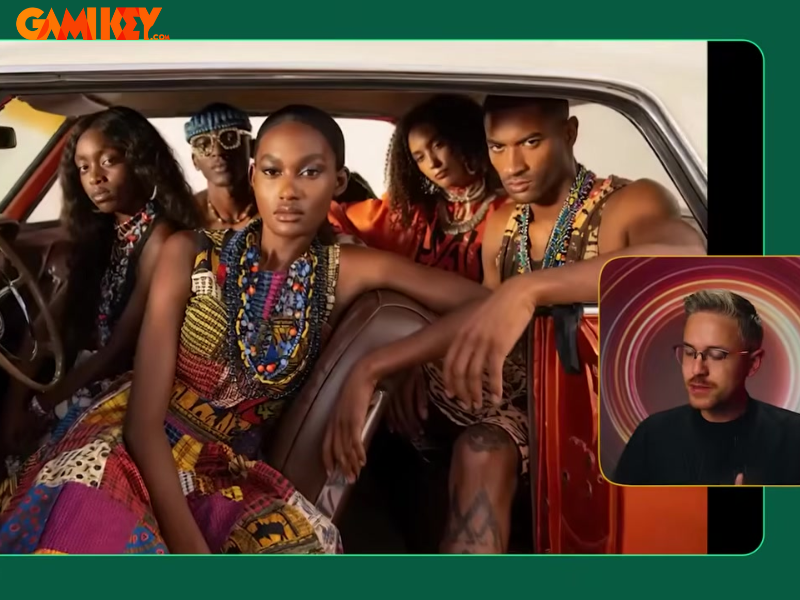
- Cinematic Video Generation from Text or Images: One of the platform’s flagship abilities is transforming basic prompts or single images into videos featuring smooth animations, sophisticated lighting effects, and authentic cinematic styles that rival traditional production techniques.
- Extensive Library of Templates and Styles: Creators benefit from a diverse collection of pre-designed templates spanning various themes and aesthetic directions. This resource significantly reduces setup time, enabling rapid prototyping and iteration without delving into intricate customizations.
- Talking Avatar Creation from Selfies: A particularly innovative feature allows users to generate lifelike digital avatars from portrait photos. These avatars exhibit natural facial expressions and synchronized speech, making them ideal for social media content, educational videos, or personalized marketing campaigns.
- Integration of Advanced AI Models: Higgsfield AI incorporates multiple state-of-the-art models, including Kling 2.1 Master, Minimax Hailuo, Seedance, and Nano Banana. Continuous updates ensure access to the latest advancements in motion accuracy, facial fidelity, and overall frame stability.
- Cross-Platform Accessibility: Full support across web, iOS, and Android platforms guarantees flexibility. The clean, user-friendly interface accommodates beginners while providing depth for advanced users.
- Video Extension Functionality: This advanced tool enables seamless prolongation of existing clips by adding coherent new segments, maintaining stylistic consistency and smooth transitions throughout extended sequences.
- Consistent Facial Preservation: Enhanced algorithms ensure that character faces remain accurate and undistorted even during complex movements, preserving identity across dynamic scenes.
These features collectively position Higgsfield AI as a versatile powerhouse, capable of addressing diverse creative demands with precision and flair.
Comprehensive Guide: How to Use Higgsfield AI for Beginners
Getting started with Higgsfield AI is remarkably straightforward, thanks to its streamlined interface and logical workflow. This section provides exhaustive, step-by-step instructions for the most popular functionalities: generating AI images, producing AI videos, and creating talking avatars. Even complete newcomers will find the process intuitive and rewarding.
Step-by-Step Process for Creating AI Images
To begin crafting stunning AI-generated images:
- Navigate to the official site at https://higgsfield.ai/ or launch the mobile application. Complete the login process using your preferred method—email, Google, Apple, or Microsoft account—for personalized access and credit management.
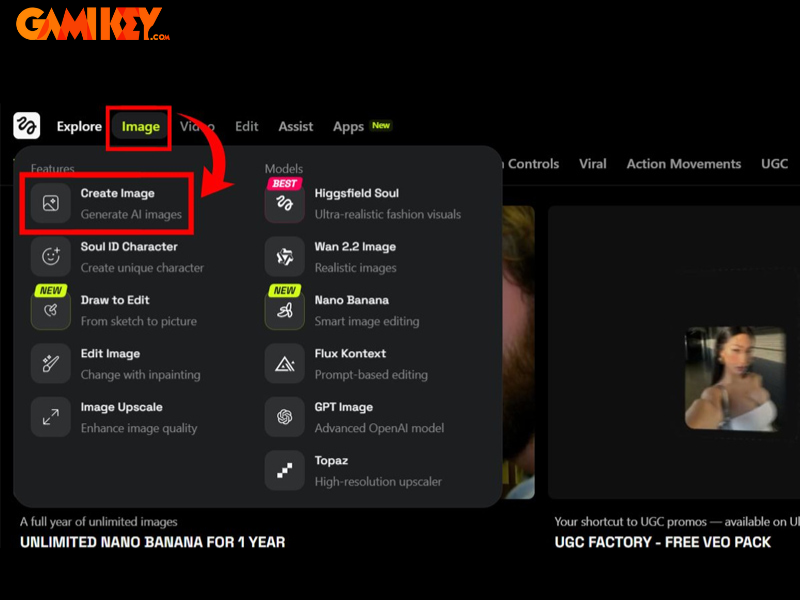
- On the main dashboard, locate and select the “Image” tab, followed by the “Create Image” option to enter the dedicated generation environment.
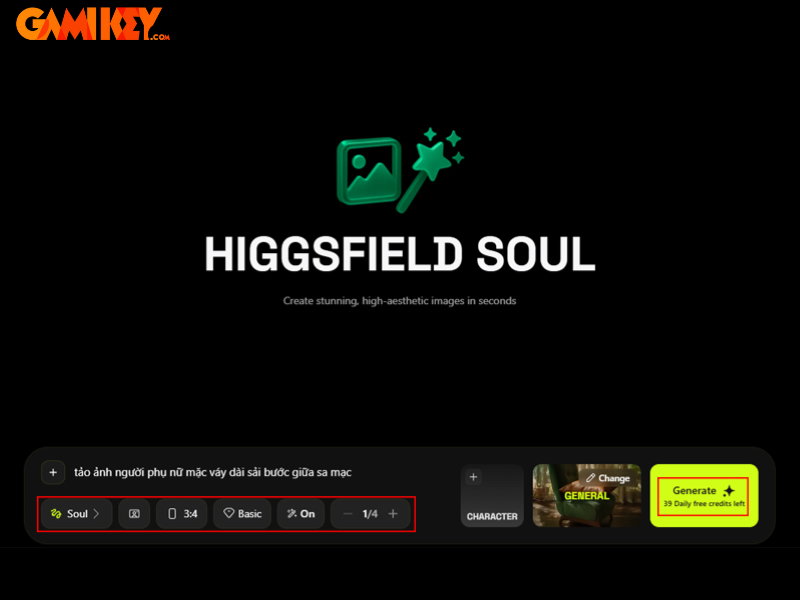
- Craft a detailed textual prompt describing your desired visual. Fine-tune parameters such as aspect ratio, enable or disable automatic prompt enhancement, experiment with different artistic styles via the style selector, and choose an appropriate processing package based on complexity and speed requirements. Initiate generation with the prominent “Generate” button.
- Once complete, review the output. Utilize built-in editing tools for minor adjustments if necessary, then download the high-resolution image to your device for further use.
This workflow typically yields impressive results in moments, allowing iterative experimentation to perfect your vision.
Detailed Instructions for Generating AI Videos
Transforming static elements into moving masterpieces follows a similarly efficient path:
- After logging in, direct your attention to the “Video” section on the primary interface and select “Create Video” to access the video synthesis tools.
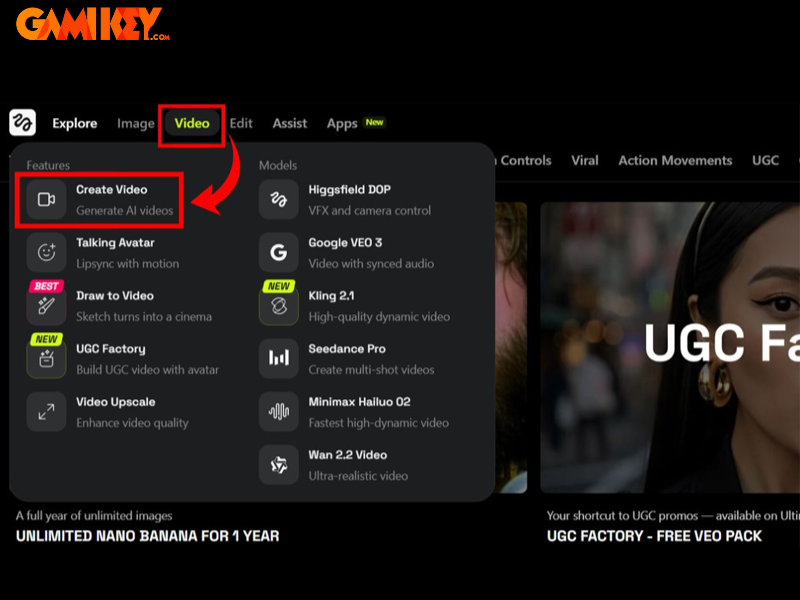
- Upload your source image—the foundation for the animation. Proceed by exploring style options through the dedicated selector, inputting a precise motion description in the prompt field, choosing a suitable processing tier, and triggering creation via “Generate.”
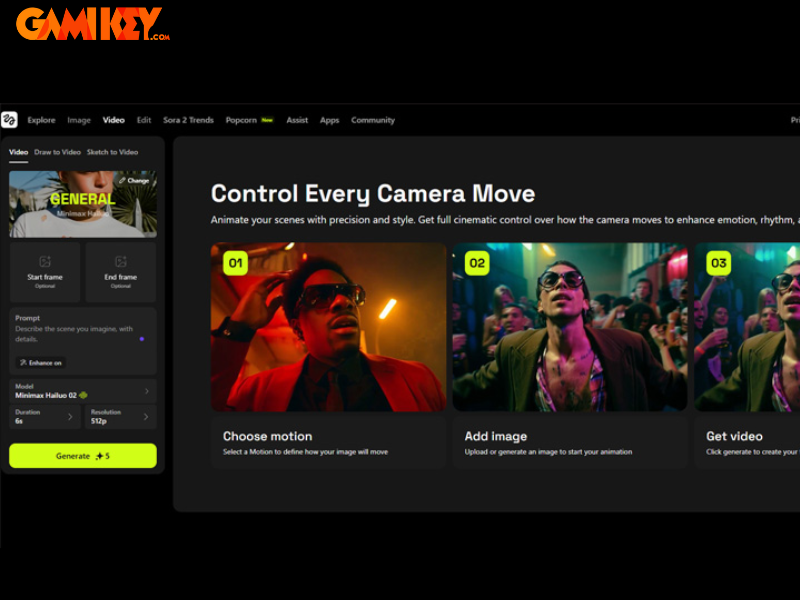
- Preview the resulting video clip. Make any required tweaks using available controls, then export the finished product in your preferred format.
The resulting videos often feature remarkably fluid motion and atmospheric depth, demonstrating the platform’s sophisticated understanding of visual dynamics.
Complete Tutorial for Producing AI Talking Avatars
Bringing digital characters to life with speech and expression involves these precise steps:
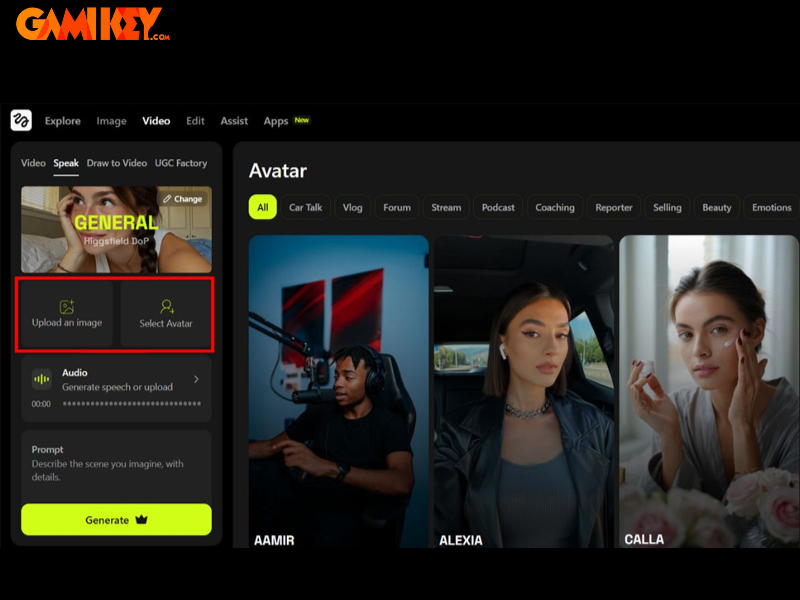
- From the home screen, navigate to the “Video” category and activate the “Speak” feature specifically designed for avatar animation.
- Provide a clear portrait image by uploading your own or selecting from the library. Supply audio input either by uploading a file or entering text for synthetic voice generation. Define the desired expression style through prompts, select your processing package, and commence generation.
Beyond these core functions, Higgsfield AI offers additional specialized tools that expand creative horizons:
- Draw to Video: Convert hand-drawn sketches into fully animated sequences, ideal for storyboarding or conceptual visualization.
- UGC Video Creation: Produce authentic, user-generated-content-style videos perfect for reviews, testimonials, or casual vlogs.
- AI-Powered Video Editing: Refine and enhance existing footage through intelligent automated adjustments and effects.
Each of these modes adheres to the same fundamental principles: source material upload, descriptive prompting, style application, and final generation. This consistency across features minimizes the learning curve while maximizing productivity.
Mastering how to use Higgsfield AI effectively involves practice with prompts and exploration of its vast style library. Experimentation reveals nuances in achieving specific aesthetic outcomes, from hyper-realistic renders to stylized artistic interpretations.
As AI technology continues to advance, platforms like Higgsfield AI are redefining content creation paradigms. By combining accessibility with professional-grade results, it empowers a broader audience to participate in visual storytelling. Whether producing marketing materials, social media assets, educational content, or personal projects, the possibilities are virtually limitless.
The integration of multiple leading AI models ensures that outputs remain at the forefront of quality and innovation. Features such as precise facial retention and seamless video extension address common pain points in AI generation, delivering more reliable and polished results.
For optimal experiences, consider crafting detailed prompts that include specifics about lighting, camera angles, mood, and action sequences. Combining reference images with textual descriptions often yields superior coherence and detail.
In summary, Higgsfield AI stands as a transformative tool in the realm of AI-assisted creativity. Its blend of speed, quality, and user-centric design makes it an essential resource for anyone looking to elevate their visual content game. Dive in today and discover how effortlessly compelling videos and images can be brought to life.