

Understanding Windows Media Player: A Comprehensive Overview
Among the classic tools for enjoying digital entertainment on personal computers, Windows Media Player stands out as a reliable and familiar option for countless users. Developed by Microsoft, this built-in application has long served as a versatile platform for playing audio tracks, watching videos, and organizing multimedia collections. In this in-depth exploration, we delve into the essence of Windows Media Player, its standout capabilities, comparative strengths, advantages, limitations, and current status in the modern computing landscape.
Key Highlights and Capabilities of Windows Media Player
Windows Media Player distinguishes itself through a suite of practical and user-oriented features designed to enhance everyday media consumption. Below is an expanded examination of its most notable attributes:
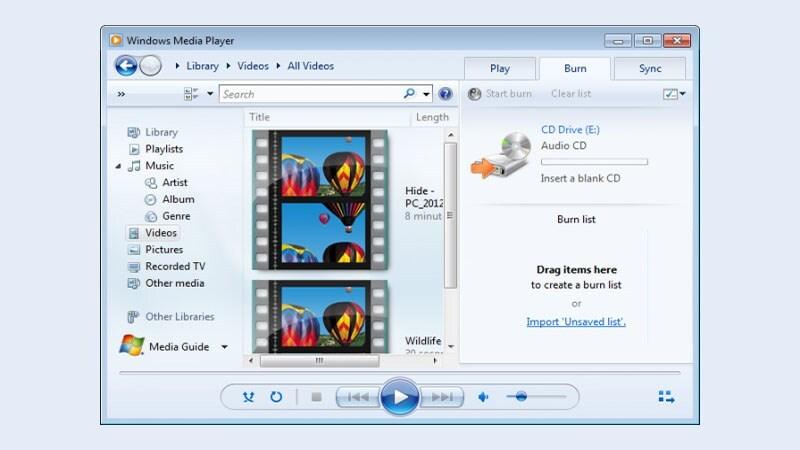
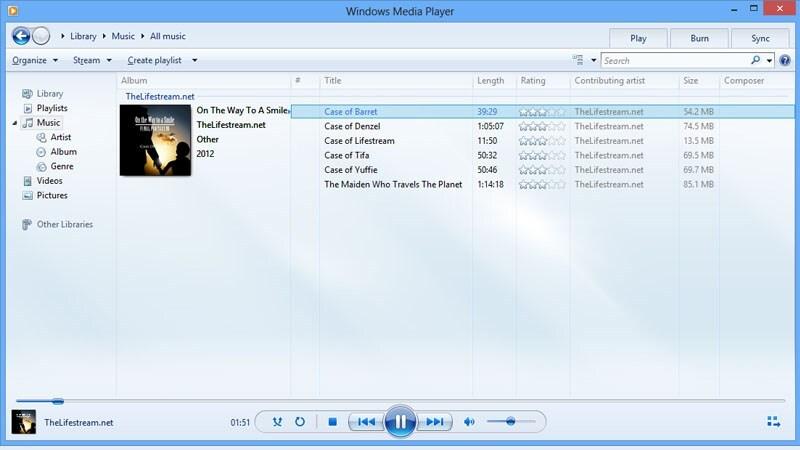
- Robust Library Organization: The application excels at structuring multimedia files into an intuitive hierarchical library. Users can effortlessly categorize music by artist, album, genre, or year, while videos and photos receive similar treatment. This tree-like navigation system allows quick searches and seamless integration with external devices, such as older gaming consoles, for shared playback experiences.
- Seamless Device Synchronization: One of the enduring strengths is its ability to sync personal media libraries with portable players and storage devices. Upon connection via USB, the software detects compatible hardware and transfers selected playlists or entire collections automatically, ensuring favorite content is always accessible on the go.
- Audio Disc Burning Functionality: Creating custom audio CDs remains straightforward. Users compile tracks into a dedicated burn queue, adjust settings like gapless playback if desired, and initiate the recording process. The result is a professionally formatted disc compatible with traditional car stereos, home audio systems, and legacy players.
- Advanced Playback Customization: Audio enthusiasts appreciate tools such as graphic equalizers, crossfade transitions between tracks, auto-volume leveling, and simulated surround effects. Video playback benefits from adjustable visual enhancements including brightness, contrast, saturation, and hue controls, allowing fine-tuning for different display environments.
- Playlist Creation and Management: Building personalized playlists is intuitive through drag-and-drop mechanics. Additional options include rating songs with stars, auto-generated smart lists based on criteria like most-played tracks, and dynamic playlists that update according to user-defined rules.
- Compact Mode Integration: For multitasking, the player offers a minimized view that anchors to the taskbar. Even in this reduced state, essential controls—play/pause, skip, volume, and visual thumbnails—remain fully accessible without restoring the full window.
- Skin and Visualization Support: Early versions popularized customizable skins and animated visualizations that react to music rhythms, adding a visually engaging layer to audio playback sessions.
- Metadata Retrieval and Editing: The software automatically fetches album art, track details, and artist information from online databases (when connected), while permitting manual corrections for accuracy.
Comparative Analysis: Windows Media Player Versus Modern Alternatives
To appreciate the position of Windows Media Player in today’s ecosystem, a detailed comparison with leading third-party players proves insightful. The following table evaluates core aspects against VLC Media Player, KMPlayer, and Media Player Classic Home Cinema (MPC-HC):
| Evaluation Criterion | Windows Media Player | VLC Media Player | KMPlayer | MPC-HC |
|---|---|---|---|---|
| Core Playback Features | Audio/video playback, library management, CD ripping/burning | Universal format support, streaming, subtitle synchronization | Advanced codec integration, 3D and VR playback | Lightweight playback, hardware acceleration |
| Format Compatibility | Strong with Microsoft-native formats; limited elsewhere without additional codecs | Near-universal built-in support for virtually all containers and codecs | Extensive internal codecs, excellent high-resolution handling | Broad support via external codec packs |
| User Interface | Clean, Windows-native aesthetic with moderate customization | Functional and minimalist, highly configurable | Visually polished with extensive skinning options | Classic, no-frills design focused on performance |
| Library Management | Comprehensive built-in library with tagging and organization | Basic playlist support only; no dedicated library | Limited organizational tools | No native library features |
| Resource Usage | Moderate to high with large libraries | Extremely efficient even on low-end hardware | Higher demands for premium content | Minimal footprint |
| Subtitle Handling | Basic support; requires manual loading | Advanced auto-detection and styling | Deep customization of appearance and timing | Robust rendering and synchronization |
| Cost & Availability | Free, pre-installed on Windows | Free, open-source | Free with optional premium features | Free, open-source |
| Extensibility | Limited to system-installed codecs | Rich plugin ecosystem | Mostly self-contained | Relies on external filters |
| Development Status | No active feature updates since Windows 7 era | Regular updates and security patches | Ongoing enhancements | Community-maintained forks available |
Strengths and Limitations of Windows Media Player
Notable Advantages
Despite evolving competition, Windows Media Player retains several compelling benefits that continue to appeal to specific user segments:
- Zero-Cost Native Integration: Being bundled with virtually every Windows installation eliminates download and setup hurdles, making it instantly available for casual users.
- Intuitive Design Philosophy: The interface follows familiar Windows conventions, ensuring newcomers can navigate playback controls, library views, and settings without steep learning curves.
- Reliable Core Functionality: For standard formats and everyday tasks—listening to music collections, watching downloaded videos, or burning mix CDs—it performs consistently without unnecessary complexity.
- Strong Legacy Device Compatibility: Older portable media players and car head units often sync more reliably with WMP than with modern alternatives.
- Built-in Ripping Tools: Converting audio CDs to digital files with customizable bitrate and format options remains a straightforward process.
Areas for Improvement
Contemporary expectations have exposed certain shortcomings that influence its relevance today:
- Restricted Format Ecosystem: Without supplemental codec packs, playback of newer or niche containers can fail, contrasting sharply with universal players.
- Stagnant Development Cycle: Microsoft shifted focus away from active enhancement after version 12, leaving missing modern capabilities like native 4K HDR support or streaming service integration.
- Resource-Intensive Library Indexing: Scanning and maintaining metadata for extensive collections can strain system resources compared to lightweight competitors.
- Limited Cross-Platform Presence: Availability is confined to Windows environments, with no official mobile or macOS equivalents.
- Outdated Visualization and Skinning: Once innovative, these aesthetic features now appear dated beside current design trends.
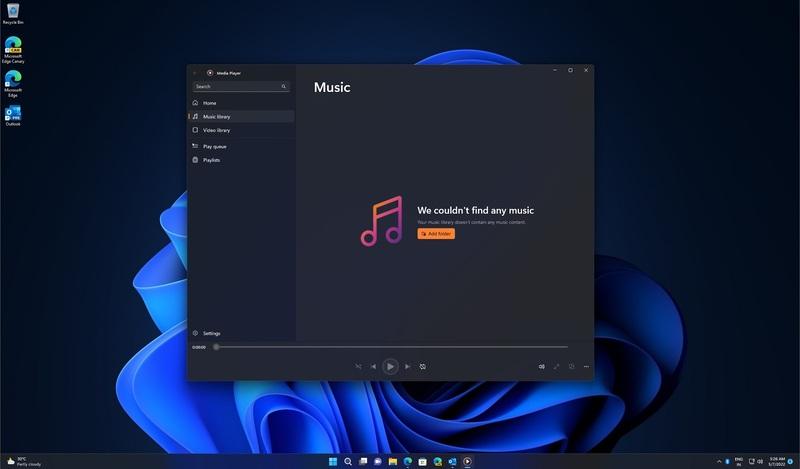
- Reduced Emphasis in Recent Windows Releases: Starting with Windows 10, Microsoft promoted Groove Music (later rebranded) and the Films & TV app as default experiences, relegating WMP to optional installation status.
Current Version and Evolution of Windows Media Player
The final major release, Windows Media Player 12, launched alongside Windows 7 in October 2009. This iteration introduced refined library views, improved playback engines, and enhanced device synchronization. Subsequent Windows editions retained version 12 as an optional component rather than pursuing significant upgrades.
Microsoft gradually redirected users toward specialized successors: Groove Music (now simply Music) for audio and the Films & TV application for video content. Nevertheless, Windows Media Player remains installable via Windows Features settings in Windows 10 and 11, preserving compatibility for those who prefer its classic workflow.
Community interest has sustained third-party enhancements and skins, ensuring the player continues functioning effectively on contemporary hardware despite lacking official updates.
In summary, while Windows Media Player may no longer dominate the multimedia landscape, its legacy as a dependable, integrated solution endures. For users seeking simplicity, native Windows harmony, and proven reliability with standard media tasks, it remains a viable choice worthy of consideration alongside more feature-rich alternatives.