

Adobe Lightroom stands as one of the most powerful and widely adopted tools in the realm of professional photo editing. Renowned for its sophisticated capabilities combined with an intuitive interface, it empowers users at all skill levels to achieve stunning results. This comprehensive guide delves deeply into its core strengths, innovative features, and practical applications, providing photographers, designers, and enthusiasts with the insights needed to elevate their workflow.
Overview of Adobe Lightroom: A Modern Photo Editing Powerhouse
Adobe Lightroom, officially known as Adobe Photoshop Lightroom, represents an evolution in digital image processing. While it builds upon the foundational principles of its predecessor, Photoshop, it introduces streamlined workflows specifically tailored for photographers. The software excels in non-destructive editing, allowing creators to refine images while preserving original files intact.
One of its defining characteristics is the seamless integration of advanced editing tools with robust digital asset management. This dual functionality transforms Adobe Lightroom into an all-in-one solution for importing, organizing, editing, and exporting photographs. Compatible across major platforms—including Windows, macOS, iOS, and Android—it ensures a consistent experience whether working on a desktop workstation or a mobile device.
The appeal of Adobe Lightroom spans from hobbyists experimenting with their first edits to seasoned professionals managing extensive portfolios. Its cloud-based synchronization further enhances accessibility, enabling users to begin work on one device and continue effortlessly on another.
Exceptional Features That Set Adobe Lightroom Apart
What truly distinguishes Adobe Lightroom from traditional editing software is its array of cutting-edge features designed to maximize creative control while minimizing complexity. These tools cater to the demands of modern photography, from subtle enhancements to dramatic transformations.
Advanced RAW Processing Capabilities
At the heart of professional-grade editing lies the ability to work with RAW files. Adobe Lightroom offers unparalleled support for RAW formats from virtually every camera manufacturer. This allows photographers to extract maximum detail from shadows and highlights, recover clipped areas, and correct lens aberrations such as chromatic aberration—those unwanted purple or green fringes along high-contrast edges.
Editing directly on RAW data ensures lossless adjustments, maintaining exceptional sharpness, dynamic range, and color fidelity. A particularly efficient feature is the ability to create and apply presets across multiple images simultaneously. This batch processing dramatically reduces time spent on repetitive tasks, making it ideal for event photographers handling hundreds or thousands of shots.
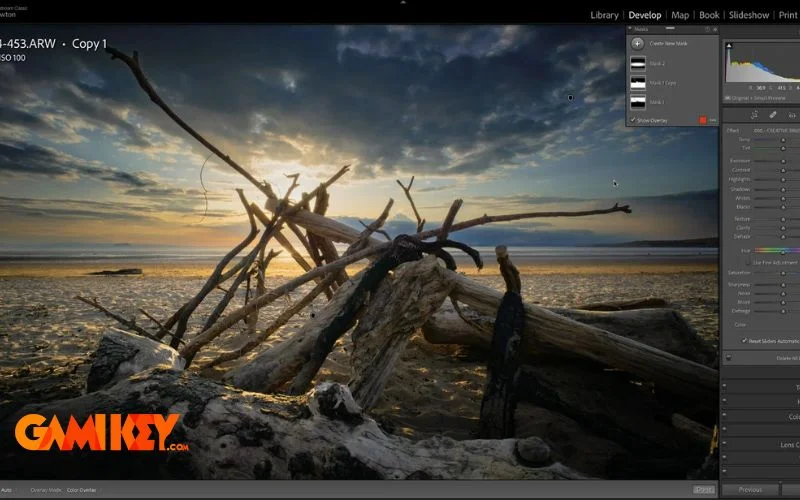
Additionally, the Develop module provides precise controls over noise reduction, sharpening, and grain simulation, enabling users to achieve a polished yet natural look that reflects their artistic vision.
Professional Color Grading and Blending Tools
Color manipulation in Adobe Lightroom reaches new heights through sophisticated blending and grading options. The HSL/Color panel allows targeted adjustments to hue, saturation, and luminance for individual color channels. Tone curves offer granular control over contrast and tonal distribution, while split toning adds creative warmth or coolness to highlights and shadows independently.
Advanced tools like radial and graduated filters enable localized enhancements, simulating the effects of physical lens filters. The calibration panel corrects camera-specific color profiles, ensuring accurate rendition from capture to output. For creative expression, users can experiment with color lookup tables (LUTs) or build custom profiles that define their signature style.
These features collectively empower photographers to craft cohesive visual narratives, whether aiming for vibrant travel shots, moody portraits, or minimalist product imagery.
Intelligent Photo Organization and Management
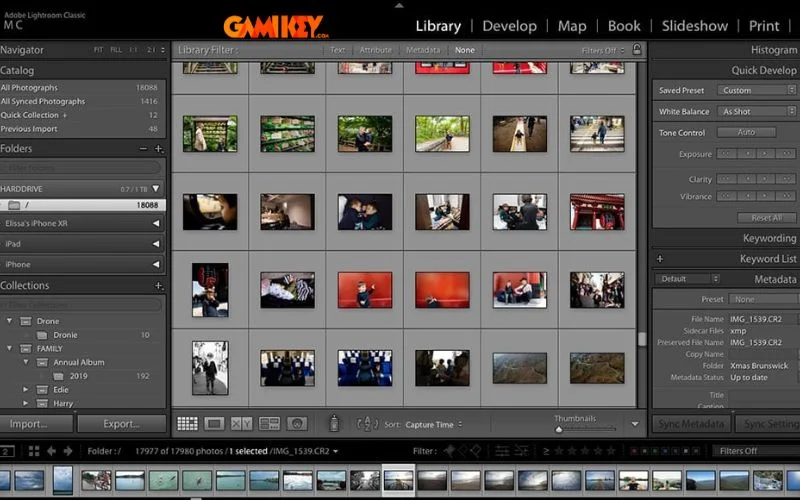
Beyond editing, Adobe Lightroom‘s library module revolutionizes asset management. The catalog system stores metadata and edit instructions separately from image files, resulting in lightweight, fast-loading databases. Users can assign keywords, ratings, flags, and color labels to streamline searching and filtering.
Smart collections automatically group images based on criteria such as capture date, camera model, or applied keywords. Facial recognition technology identifies and tags individuals across libraries, simplifying portrait organization. Virtual copies allow multiple edit variations of a single image without duplicating files, conserving storage space.
Integration with Adobe Cloud ensures backups and synchronization, protecting valuable work against hardware failures while enabling remote access.
Effortless Red-Eye Correction and Healing
Common imperfections like red-eye in flash photography are addressed with a dedicated removal tool that intelligently detects and neutralizes the effect. The healing brush and clone stamp provide spot removal with content-aware filling, seamlessly erasing dust spots, blemishes, or unwanted objects.
Adjustable brush parameters—including opacity, feather, and flow—offer precise control, ensuring repairs blend naturally with surrounding areas.

Unlimited History and Non-Destructive Workflow
A cornerstone of Adobe Lightroom is its non-destructive editing paradigm. Every adjustment is recorded as an instruction rather than permanently altering pixels. The History panel tracks changes indefinitely, allowing reversion to any previous state—even after closing and reopening the application.
Snapshots capture specific edit states for quick comparison, while the ability to copy and paste settings across images ensures consistency. This flexibility encourages experimentation without fear of irreversible mistakes.
Automated HDR and Panorama Merging
High dynamic range (HDR) and panoramic photography benefit from automated merging algorithms. Adobe Lightroom aligns bracketed exposures or overlapping frames with remarkable accuracy, correcting for lens distortion and perspective shifts.
The resulting DNG files retain full editability, permitting further refinements in tone mapping, ghosting reduction, and boundary warping. Boundary Warp and Auto Settings streamline the process, delivering expansive, detail-rich composites ready for print or digital display.
These specialized tools position Adobe Lightroom as an essential companion for landscape, architectural, and interior photographers seeking immersive wide-angle or extended dynamic range imagery.
Getting Started with Adobe Lightroom: Best Practices and Access
To unlock the full potential of Adobe Lightroom, a subscription through Adobe’s Creative Cloud is recommended. This provides access to both the Classic desktop version—ideal for comprehensive catalog management—and the cloud-centric ecosystem version optimized for cross-device workflows.
Upon installation, users are greeted by an organized modular interface: Library for organization, Develop for editing, Map for geotagging, Book, Slideshow, Print, and Web for output. Keyboard shortcuts and customizable workspaces enhance efficiency as proficiency grows.
Beginners benefit from guided tutorials and preset libraries, while advanced users appreciate AI-powered features like Adaptive Presets, Subject Selection masks, and Content-Aware Remove. Regular updates introduce innovations such as generative fill (powered by Adobe Firefly) and enhanced denoising, keeping the software at the forefront of imaging technology.
Adobe Lightroom continues to redefine professional photo editing by balancing power with accessibility. Its thoughtful design encourages creative exploration while delivering the precision demanded by industry standards. For anyone serious about photography—whether capturing moments for personal memory or producing client deliverables—this software remains an indispensable asset in the digital darkroom.
Explore additional Adobe ecosystem insights through related resources:
- Understanding Adobe InDesign for layout and publishing
- Discovering Adobe Spark for quick graphic creation
- Exploring Adobe Firefly’s generative AI capabilities
- Mastering color theory with Adobe Color tools