

Many creators, marketers, and beginners often wonder about powerful yet accessible design tools. Adobe Spark, originally launched as an intuitive online platform for quick content creation, has evolved significantly over the years. Today, it is known as Adobe Express, building on its foundation with advanced AI integrations and expanded capabilities. This guide delves deeply into its origins, core functionalities, and why it remains a go-to choice for efficient visual storytelling, even as the creative landscape advances in 2025.
Understanding Adobe Spark: Origins and Evolution
Adobe Spark emerged as a groundbreaking web-based application designed to democratize professional-grade design. It operated entirely online, offering an extensive library of pre-built templates that users could customize effortlessly. This approach dramatically reduced the time needed for creating graphics, videos, and web pages, making high-quality design accessible without steep learning curves or expensive software installations.
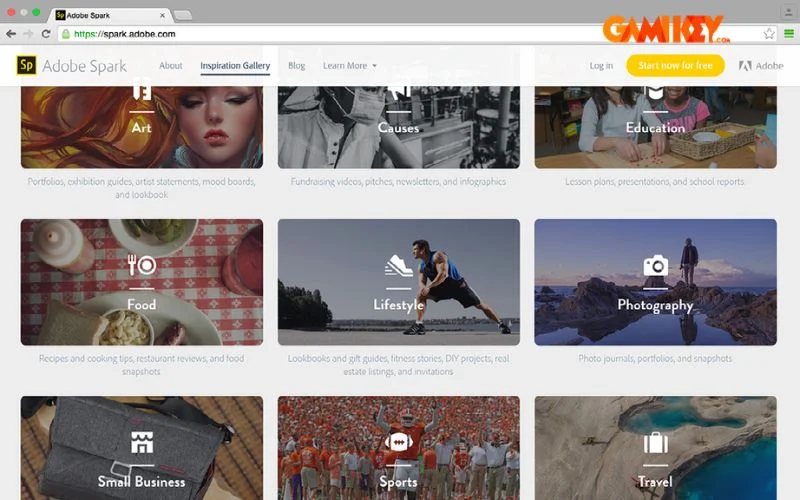
Users typically began projects by inputting a key phrase, tagline, or title, which triggered a curated selection of layout options tailored to different formats, such as promotional videos or social media posts. The platform’s strength lay in its simplicity, allowing rapid prototyping and iteration.
The tool’s template-driven workflow empowered non-designers to produce polished results quickly. From social media banners to animated clips, Adobe Spark prioritized speed and accessibility, integrating seamlessly with cloud services for asset management. Its evolution into modern iterations has preserved this core philosophy while incorporating cutting-edge technologies like generative AI.
In retrospect, Adobe Spark set the standard for template-based creation, influencing countless tools in the industry. It allowed users to focus on ideas rather than technical hurdles, fostering creativity across education, marketing, and personal projects.
Key Features That Defined Adobe Spark
The standout aspects of Adobe Spark revolved around its versatile toolset, enabling diverse content types with professional polish. These features catered to a wide audience, from solo creators to small teams seeking efficient workflows.
Professional Graphic Design Capabilities
One of the hallmark strengths was its robust graphic design module. Users could layer text over images, apply sophisticated filters, and adjust dimensions to match platform-specific requirements—ensuring optimal display on networks like Instagram stories versus Facebook feeds or Twitter headers.
The extensive font library, drawn from premium collections, paired with thousands of high-resolution stock photos sourced from integrated services such as Google Photos, Dropbox, and Adobe’s own ecosystems, provided endless inspiration. This made crafting compelling product visuals, advertisements, or branded posts straightforward and visually striking.
Customization extended to shapes, layouts, and color palettes, allowing precise alignment with brand guidelines. For marketers, this meant consistent, eye-catching assets that drove engagement without needing advanced skills in tools like Photoshop.

Beyond basics, users could experiment with layering effects, opacity adjustments, and icon integrations, resulting in designs that rivaled those from dedicated desktop software. This feature alone made Adobe Spark indispensable for rapid content production in fast-paced digital environments.
Additionally, the platform encouraged exploration through suggested themes and color harmonies, helping users refine their aesthetic sense over time. For businesses, it streamlined the creation of marketing collaterals like flyers, posters, and infographics.
Intuitive Video Advertisement Creation
Video tools formed another pillar of excellence. Starting with static images or clips, creators added voiceovers, background music, motion effects, and transitions to produce dynamic advertisements or storytelling videos.
The interface prominently displayed editing options, including animation presets that transformed text and images into engaging sequences. Users could animate elements individually or apply themes for cohesive motion graphics.
This functionality shone in social media marketing, where short, captivating videos boost visibility. Options for timing, pacing, and soundtrack selection ensured personalized outputs, from energetic promos to serene narratives.
Exporting in various resolutions and aspect ratios accommodated different platforms, maximizing reach. The ease of converting graphic designs into animated videos bridged static and dynamic content seamlessly.
Advanced users appreciated the ability to fine-tune keyframes and layer animations, achieving near-professional results without complex timelines found in Premiere Pro.
Seamless Synchronization Across Devices
Cloud-based synchronization was a game-changer, automatically backing up projects to secure storage. This allowed uninterrupted workflows across desktops, laptops, tablets, and smartphones.
Whether drafting on a commute via mobile or refining on a larger screen at home, changes synced instantly. Integration with Creative Cloud services enhanced this, pulling in assets from other Adobe tools.
This mobility supported collaborative scenarios, where team members accessed shared projects remotely. Version history further protected against losses, allowing reversion to previous states if needed.
In educational settings, students benefited immensely, switching devices without disruption. Professionals on the go found it liberating, turning idle moments into productive ones.
Compelling Reasons to Embrace Adobe Spark
Despite the rise of competitors, Adobe Spark‘s legacy features continue to offer unique advantages, particularly for those valuing streamlined, template-rich design experiences.
User-Friendly Interface Design
The layout prioritized intuition, with logically grouped tools and drag-and-drop functionality. Menus were minimalistic, reducing overwhelm for newcomers while providing depth for experienced users.
Onboarding was swift; tutorials and prompts guided initial steps, building confidence rapidly. This accessibility made it ideal for educators introducing design concepts or businesses empowering non-specialists.
Keyboard shortcuts and gesture supports on mobile enhanced efficiency, mirroring professional workflows in a simplified package.
Affordable Premium Access
While a free tier offered substantial tools, premium subscriptions unlocked unrestricted templates, advanced assets, and removal of watermarks. Pricing remained competitive, especially compared to full Creative Cloud suites.
Licensed accounts provided long-term access, often with bundled support and updates. This one-time investment model appealed to budget-conscious users seeking reliability.
Premium perks included higher storage quotas and priority exports, justifying the cost for frequent creators. Community resources and templates expanded value further.
Adobe Spark revolutionized accessible design, blending professional tools with ease of use. Its features—from graphics and video editing to seamless syncing—empowered countless users to produce captivating content. As the foundation for today’s Adobe Express, it continues to influence modern creation tools.
For those exploring Adobe ecosystem options, consider related guides on other powerful software solutions.
- Discover the capabilities of Adobe Firefly
- Explore Adobe Color for palette inspiration
- Learn about Adobe Fresco for digital painting
- Understand Adobe Media Encoder for video processing
These resources highlight the breadth of Adobe’s creative offerings, building on the innovative spirit pioneered by Adobe Spark.