

Have you ever wished to quickly grasp the essence of a YouTube video without watching it from start to finish? Thanks to advanced AI technology like ChatGPT, this is now effortlessly achievable. In this comprehensive guide, we delve into the efficient method of summarizing YouTube content with ChatGPT, offering a streamlined approach that saves valuable time while ensuring you capture the core messages and insights in mere moments.
Key Advantages of Summarizing YouTube Content with ChatGPT
Utilizing ChatGPT to condense YouTube videos brings a host of practical benefits, transforming how we interact with online media. This innovative tool not only streamlines information absorption but also enhances accessibility and productivity in various scenarios. Let’s explore these perks in greater detail, illustrating how they can revolutionize your daily digital routine.
- Significant Time Efficiency: In today’s fast-paced world, time is a precious commodity. ChatGPT excels at distilling lengthy videos into concise overviews, allowing users to bypass hours of viewing. For instance, a 30-minute tutorial on complex topics like software development or cooking techniques can be reduced to a few key paragraphs, enabling professionals, students, and hobbyists to allocate their time more effectively toward other tasks or deeper explorations.
- Enhanced Comprehension: By focusing on pivotal elements, summaries ensure that viewers don’t miss critical details amid filler content or digressions. This is particularly useful for educational videos where core concepts might be buried in examples or anecdotes. Imagine reviewing a lecture on quantum physics; a well-crafted summary highlights theorems, experiments, and implications, making it easier to retain and apply the knowledge without the risk of information overload.
- Effortless Information Retrieval: When revisiting specific segments, a structured summary acts as a roadmap. It indexes timestamps or thematic sections, so you can jump directly to relevant parts. This feature is invaluable for researchers compiling data from multiple sources or content creators seeking inspiration, as it minimizes the frustration of scrubbing through timelines to locate that one elusive quote or demonstration.
- Boosted Learning Outcomes: For instructional materials, summaries facilitate better study habits. They serve as quick reference guides for revision, reinforcing learning through repetition in a compact form. Students preparing for exams, for example, can use these overviews to quiz themselves on main ideas from history documentaries or science explainers, leading to improved retention rates and more confident performance in academic settings.
- Increased Accessibility for Diverse Audiences: Individuals with hearing impairments benefit immensely, as text-based summaries provide an alternative to audio-dependent subtitles. Beyond that, it supports non-native speakers by simplifying language and structure, making global content more inclusive. Consider how this empowers international learners accessing foreign-language tutorials on topics like language acquisition or cultural studies, bridging gaps that traditional viewing might exacerbate.
To maximize these benefits, consider integrating premium tools. Explore affordable options for YouTube Premium accounts and ChatGPT Plus subscriptions available at buyaitools, which unlock advanced features like ad-free viewing and enhanced AI capabilities for even smoother summarization experiences.
Step-by-Step Tutorial on Summarizing YouTube Videos Using ChatGPT
Embarking on the journey to summarize YouTube content with ChatGPT is straightforward, especially with the right extensions and techniques. This section provides an in-depth walkthrough, complete with tips for optimization and troubleshooting common issues. Whether you’re a novice or seasoned user, these steps will equip you with the skills to generate accurate, insightful summaries efficiently. We’ll cover installation, navigation, and advanced usage to ensure you get the most out of this powerful combination.
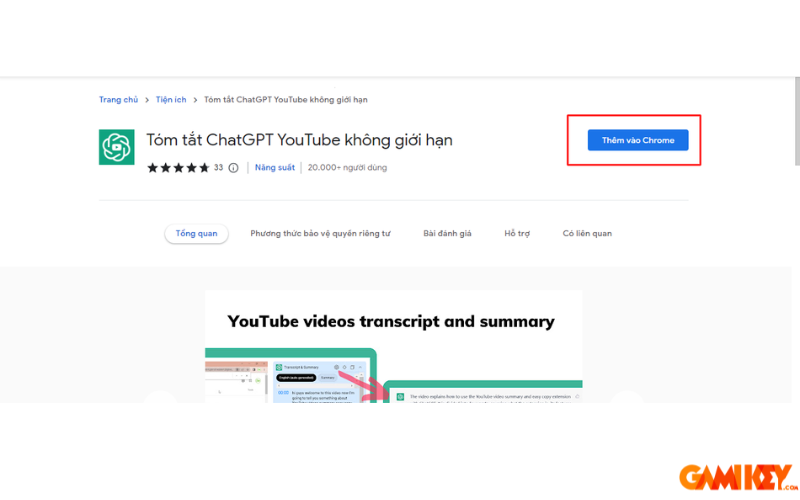
- Step 1: Begin by navigating to the official extension page for the ChatGPT YouTube summarizer. This tool integrates seamlessly with your browser, enhancing your YouTube interface with AI-driven features. Once there, click the “Add to Chrome” button to initiate the download and installation process. Ensure your browser is up to date to avoid compatibility issues. After installation, a confirmation popup will appear; restart your browser if prompted. This extension leverages ChatGPT’s natural language processing to analyze video transcripts, making it an indispensable asset for quick content digestion. For those concerned about privacy, review the extension’s permissions—they typically require access to YouTube pages only, minimizing data exposure. If you’re using alternative browsers like Firefox or Edge, check for compatible versions or equivalents to achieve similar functionality.
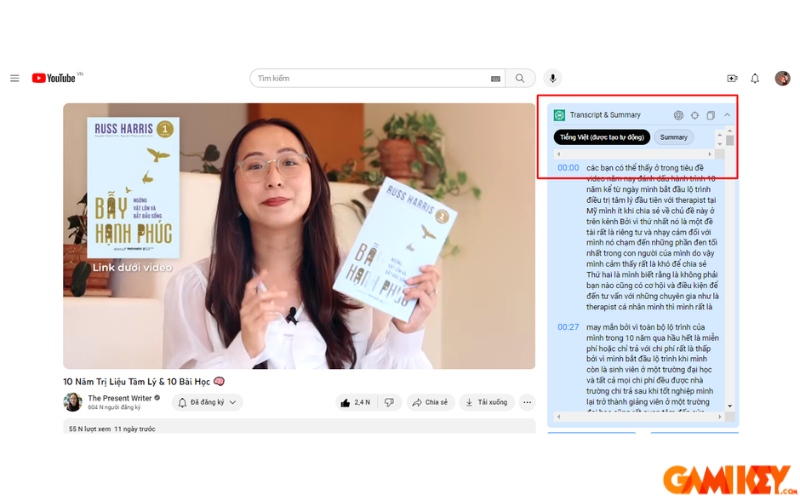
- Step 2: With the extension active, head over to YouTube and select a video of interest. On the right-hand side of the video player, you’ll notice a new panel labeled “Transcript & Summary.” This intuitive interface appears automatically for supported videos. To view the full textual representation, switch the language to English or your preferred option if available. The transcript captures spoken words verbatim, including timestamps for precise navigation. This step is crucial as it forms the foundation for AI analysis. If the video lacks auto-generated subtitles, the extension might prompt you to enable them in YouTube settings. For optimal results, choose high-quality videos with clear audio to reduce transcription errors. Additionally, explore customization options within the panel, such as font size adjustments or dark mode compatibility, to enhance readability during extended sessions.
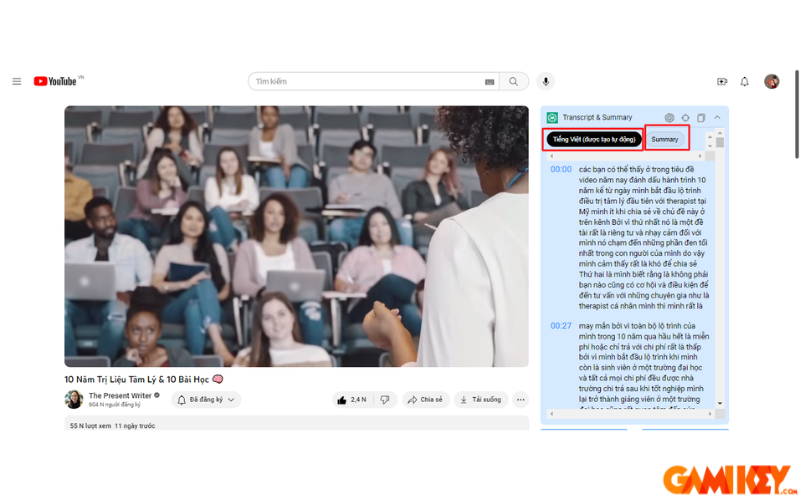
- Step 3: To generate a condensed version, access the “Transcript & Summary” panel and select the “Summary” tab. Here, ChatGPT processes the transcript, extracting main ideas, key points, and conclusions into a coherent narrative. The summary typically includes bullet points for clarity, highlighting timestamps for easy reference back to the video. Customization is possible—adjust the length for brevity or detail, or request focus on specific aspects like “key takeaways” or “actionable steps.” If the initial output isn’t satisfactory, regenerate or refine prompts within the tool. For advanced users, integrate this with ChatGPT’s web interface by copying the transcript manually for more tailored summaries, such as translating to another language or emphasizing technical terms. Always verify accuracy against the original, especially for factual content like news or tutorials, to mitigate any AI hallucinations.
Advanced Tips for Optimizing Summaries
To elevate your experience with summarizing YouTube content with ChatGPT, consider these expert strategies. First, experiment with prompt engineering—specify styles like “bullet-point format” or “narrative overview” to tailor outputs. For lengthy videos, break them into segments by timestamp and summarize individually for granular control. Integrate with note-taking apps to export summaries directly, fostering a personalized knowledge base. Address potential limitations, such as accent-heavy audio leading to transcription inaccuracies, by cross-verifying with manual checks. Ethical considerations are paramount; always credit original creators when sharing summaries. Future updates to ChatGPT may introduce multimodal capabilities, analyzing visuals alongside audio for even richer condensations.
Common Challenges and Solutions
While powerful, summarizing YouTube content with ChatGPT isn’t without hurdles. One frequent issue is incomplete transcripts for live streams or poorly subtitled videos; in such cases, use external transcription services as a fallback. Browser conflicts can arise—clear cache or disable conflicting extensions to resolve. For users on mobile devices, explore app-based alternatives or sync browser sessions. Privacy-conscious individuals should opt for incognito modes or review data policies. By anticipating these, you ensure a seamless workflow, maximizing the tool’s potential across diverse content types from podcasts to webinars.
Real-World Applications and Case Studies
The versatility of summarizing YouTube content with ChatGPT extends to numerous fields. In education, teachers curate summaries for flipped classrooms, allowing students to preview materials. Professionals in marketing analyze competitor videos swiftly to inform strategies. Journalists condense interviews for quick reporting. A case study from a tech reviewer: By summarizing gadget unboxings, they saved 70% of viewing time, focusing on innovation highlights. Another from a fitness enthusiast: Summaries of workout routines enabled personalized plans without exhaustive watches. These examples underscore the tool’s transformative impact on information management.
Comparing with Alternative Tools
While ChatGPT shines, compare it to rivals like Otter.ai for transcription accuracy or Glasp for collaborative summaries. ChatGPT’s edge lies in contextual understanding, generating human-like narratives. However, for specialized needs, hybrid approaches—combining with YouTube’s built-in chapters—yield superior results. Evaluate based on cost, ease, and integration; free tiers suffice for casual use, while premiums unlock unlimited access.
Future Trends in AI Video Summarization
Looking ahead, advancements in AI promise even more sophisticated tools for summarizing YouTube content with ChatGPT. Expect integrations with AR for visual overlays or real-time summarization during streams. Ethical AI development will prioritize bias reduction and accuracy. As content explodes, these evolutions will democratize knowledge, making expertise accessible to all.
This detailed exploration has equipped you with the essentials for summarizing YouTube content with ChatGPT in an efficient manner. Implement these techniques to enhance your productivity and engagement with video media. For the latest insights, visit the “News” section on buyaitools.
Discover more ChatGPT-related content at buyaitools:
ChatGPT Extensions Overview
What is ChatGPT Plus
Understanding ChatGPT 4
Using ChatGPT for Canva Design
How to Download ChatGPT