

The Autodesk Single Sign-On Component, commonly referred to as AdSSO, plays a crucial role in streamlining authentication processes for users of Autodesk desktop applications. This essential system tool enables seamless access to various Autodesk products and cloud services by managing login sessions efficiently after an initial sign-in. In this comprehensive guide, we delve deeply into the functionalities, operational principles, advantages, potential challenges, and best practices associated with the Autodesk Single Sign-On Component, providing professionals in design, engineering, and architecture with the insights needed to optimize their workflows.
Understanding the Autodesk Single Sign-On Component
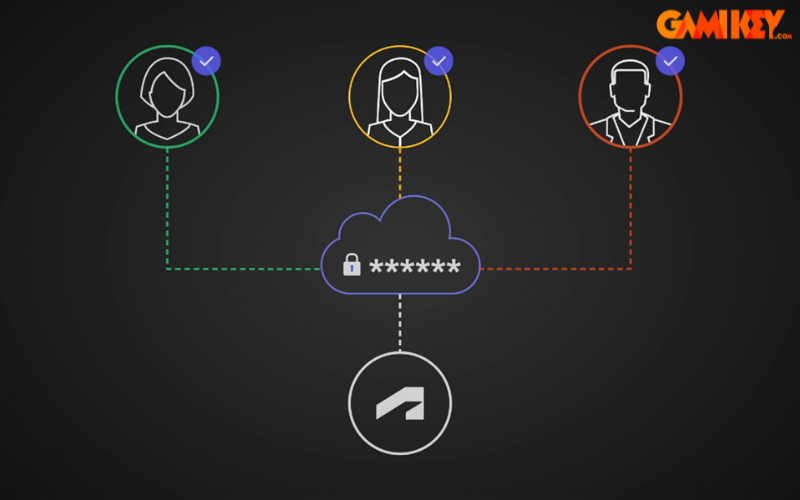
The Autodesk Single Sign-On Component (AdSSO) is a dedicated Windows-based utility developed by Autodesk to facilitate secure and efficient authentication for its suite of software products, particularly those released between 2020 and 2023. Installed automatically alongside Autodesk desktop applications such as AutoCAD, Revit, Inventor, and others, this component handles the backend processes required for signing into an Autodesk Account. It ensures that once a user authenticates successfully, subsequent accesses to related services— including cloud-based features, licensing verification, and integrations like the Autodesk Desktop Connector—occur without prompting for credentials again during the same session.
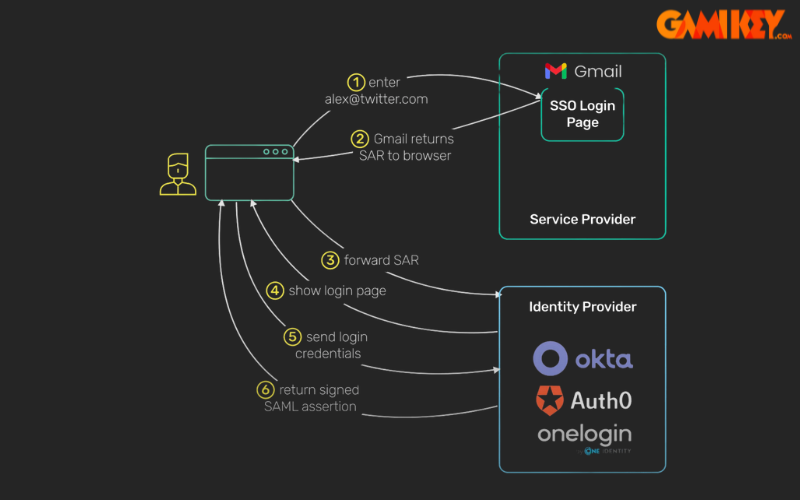
Unlike the broader enterprise-level Single Sign-On (SSO) offered by Autodesk for organizational domains (which integrates with identity providers like Microsoft Entra ID or Okta using SAML 2.0), the Autodesk Single Sign-On Component focuses primarily on local desktop authentication. It bridges the gap between the user’s machine and Autodesk’s cloud infrastructure, managing tokens, session persistence, and secure communication. This local SSO mechanism is vital for maintaining productivity in environments where multiple Autodesk tools are used interchangeably.
Beginning with Autodesk 2024 and later releases, this functionality has transitioned to the Autodesk Identity Manager, marking an evolution in how authentication is handled. However, for legacy installations and compatibility with tools like older versions of the Desktop Connector, keeping the Autodesk Single Sign-On Component updated remains essential. Autodesk regularly releases patches to address security vulnerabilities, enhance resilience, and fix bugs, underscoring its importance in the ecosystem.
In essence, the Autodesk Single Sign-On Component acts as a silent guardian of user sessions, reducing friction in daily operations while upholding stringent security standards. Professionals relying on Autodesk software benefit immensely from its ability to prevent repetitive logins, allowing more time focused on creative and technical tasks rather than administrative hurdles.
How the Autodesk Single Sign-On Component Operates
The operational mechanics of the Autodesk Single Sign-On Component revolve around modern authentication protocols and session management techniques. Upon launching an Autodesk application, the component initiates a secure connection to Autodesk’s authentication servers. Users are prompted to enter their Autodesk Account credentials (email and password), often supplemented by multi-factor authentication (MFA) for added security.
Once validated, the component generates and stores an authentication token locally in a protected manner. This token is then shared across compatible Autodesk processes running on the same machine. For instance, if you sign into AutoCAD, the token allows automatic access when opening Revit or accessing BIM 360 files via the Desktop Connector—provided the applications are within the supported version range.
Key aspects of its functioning include:
- Token-Based Authentication: Utilizes OAuth-like flows to obtain refreshable access tokens from Autodesk’s identity services.
- Session Sharing: Employs inter-process communication to propagate the authenticated state among Autodesk executables.
- Secure Storage: Credentials and tokens are encrypted using Windows Data Protection API (DPAPI) or similar mechanisms to prevent unauthorized access.
- Background Processes: Runs as AdSSO.exe, monitoring session validity and handling renewals or revocations transparently.
- Integration with Licensing: Works in tandem with the Autodesk Desktop Licensing Service to verify subscription status during sign-in.
This architecture minimizes network calls after initial login, enhancing performance especially in low-bandwidth scenarios. However, it requires a stable internet connection for the first authentication and periodic checks. Updates to the component often include improvements to error handling, crash reporting, and compatibility with evolving operating system security features.
Understanding these internals helps IT administrators troubleshoot issues, such as when the component conflicts with antivirus software or third-party VPNs, which can interrupt token propagation.
Key Advantages of the Autodesk Single Sign-On Component
The Autodesk Single Sign-On Component delivers substantial value to both individual users and organizational IT teams, contributing to smoother operations and fortified security postures.
Benefits for End Users
- Enhanced Workflow Efficiency: By eliminating repeated login prompts, users can switch seamlessly between applications like 3ds Max, Maya, or Fusion 360, maintaining momentum during intensive design sessions.
- Reduced Cognitive Load: Remembering a single set of robust credentials lowers the risk of password fatigue, encouraging stronger password choices and adherence to MFA.
- Improved Reliability in Hybrid Environments: Supports offline work resumption by caching session data, with automatic re-authentication upon reconnection.
- Consistent Experience Across Tools: Ensures uniform sign-in behavior, whether accessing local installations or cloud entitlements.
- Faster Onboarding: New team members or temporary collaborators experience minimal setup delays when granted access.
These user-centric gains translate to measurable productivity boosts, particularly in fast-paced industries like architecture, engineering, construction (AEC), and media/entertainment.
Advantages for IT Administrators and Organizations
- Centralized Update Management: Standalone installers allow proactive deployment of patches via tools like Microsoft Endpoint Manager, ensuring fleet-wide security compliance.
- Minimized Support Tickets: Fewer login-related issues reduce helpdesk workload, freeing resources for strategic initiatives.
- Compatibility Assurance: Regular updates resolve known conflicts with software such as antivirus programs or virtual desktop infrastructure (VDI).
- Audit and Monitoring Capabilities: Integrates with Autodesk Account logs for tracking sign-in activities and detecting anomalies.
- Cost-Effective Scalability: Supports large deployments without additional licensing fees for the component itself.
- Foundation for Enterprise SSO: Complements domain-level SSO configurations, providing a robust local fallback.
Overall, the Autodesk Single Sign-On Component contributes to a more secure and efficient ecosystem, aligning with modern zero-trust principles by validating identities at multiple touchpoints.
Potential Challenges and Limitations
While highly beneficial, the Autodesk Single Sign-On Component is not without drawbacks, particularly in certain deployment scenarios.
- Network Dependency: Initial authentication and token refreshes require internet access; intermittent connections can cause delays or failed logins, impacting remote workers.
- System Requirements and Compatibility: Specific Windows versions, browser integrations, or hardware configurations may be needed, leading to issues on older machines.
- Software Conflicts: Known interferences with certain security tools, VPN clients, or other Autodesk components can manifest as crashes or stalled processes.
- Provider Reliance: Outages or changes in Autodesk’s authentication infrastructure can temporarily disrupt access across all dependent applications.
- Transition Considerations: Migrating to newer versions (2024+) involving the Identity Manager may require planning to avoid double sign-in prompts in mixed environments.
Addressing these involves proactive monitoring, timely updates, and leveraging Autodesk’s diagnostic tools. In enterprise settings, combining with full SSO mitigates many local limitations.
Best Practices for Managing and Troubleshooting
To maximize the value of the Autodesk Single Sign-On Component, consider these expert recommendations:
- Always install the latest update via Autodesk Access or direct download before deploying new software versions.
- End the AdSSO.exe process in Task Manager prior to updates to avoid installation conflicts.
- Use clean uninstall tools if corruption is suspected, followed by reinstallation.
- Monitor for conflicting applications and apply exclusions in security software.
- In mixed-version environments, test compatibility with Desktop Connector for single sign-in behavior.
- Educate users on proper sign-out procedures to prevent token lingering on shared devices.
Advanced troubleshooting may involve reviewing Windows Event Logs for AdSSO-related entries or consulting Autodesk’s knowledge base for specific error codes.
In conclusion, the Autodesk Single Sign-On Component remains a cornerstone of efficient and secure access to Autodesk’s powerful tools. By understanding its role, leveraging its strengths, and mitigating its limitations, professionals can ensure uninterrupted creativity and collaboration. For those seeking genuine Autodesk subscriptions to fully utilize these features, reputable providers offer reliable options tailored to individual and enterprise needs.
Explore further resources on Autodesk technologies:
- How to Remove Autodesk Genuine Service
- Understanding Autodesk License Service
- Overview of Autodesk Maya
- Introduction to Autodesk 3ds Max
- Exploring Autodesk Fusion 360