

In recent years, the Locket Widget app has captured the imagination of millions, particularly among younger users seeking more intimate ways to stay connected in a digital world. This innovative tool redefines casual sharing by delivering live, unedited photos directly to the home screens of close friends and family. If you’ve been wondering about the buzz surrounding Locket and specifically how to add friends on Locket, this comprehensive guide explores everything from its core functionality to advanced connection strategies.
Understanding the Locket Widget App
The Locket Widget is a mobile application designed exclusively for iOS and Android devices that transforms the traditional home screen into a private photo-sharing portal. Unlike conventional social platforms where posts are curated, filtered, and often delayed, Locket emphasizes authenticity. Every image sent appears instantly on the recipient’s home screen widget as a live snapshot taken in the moment—no edits, no filters, just genuine glimpses into daily life.
This real-time approach has propelled Locket into a cultural phenomenon, especially among Gen Z users who value privacy and meaningful interactions over broad broadcasting. By limiting visibility to a select circle, the app fosters deeper emotional bonds, turning ordinary moments—like a morning coffee or a sunset walk—into shared experiences that strengthen relationships without the noise of public feeds.
What sets Locket apart is its seamless integration with device home screens. Users add a customizable widget that cycles through incoming photos from connected contacts, creating a dynamic, ever-changing gallery that feels personal and immediate. This design philosophy prioritizes closeness in an era dominated by distant digital connections.
Advantages of Sharing Live Photos with Friends via Locket
Embracing Locket for interpersonal communication offers numerous benefits that enhance relational dynamics in subtle yet profound ways. Here are some key advantages:
- Instant visibility of everyday moments on loved ones’ home screens cultivates a sense of constant presence, bridging physical distances effortlessly.
- Real-time updates from friends provide spontaneous joy and reassurance, maintaining strong ties even during busy schedules or long separations.
- The closed-network model ensures complete privacy—only mutually approved contacts can exchange photos, eliminating risks associated with open social media.
- Encourages mindfulness and appreciation for small joys, as unedited shares promote authenticity over perfectionism.
- Reduces screen time on larger platforms by focusing interactions on a dedicated, low-pressure space.
Beyond these, Locket subtly reinforces emotional support networks. Receiving an unexpected photo during a tough day can uplift spirits, while sending one offers a quiet way to say “I’m thinking of you.” This bidirectional flow creates a virtuous cycle of connection that feels organic and rewarding.
Simple Methods to Add Friends on Locket
Building your Locket circle is straightforward, with multiple intuitive options to suit different preferences. Below are the primary approaches explained in detail.
Adding Friends Using an Invitation Link
This method leverages shareable links for flexible outreach across platforms.
Step 1: Launch the Locket app on your smartphone. On the main interface, tap the “Friends” icon located in the top-right corner.
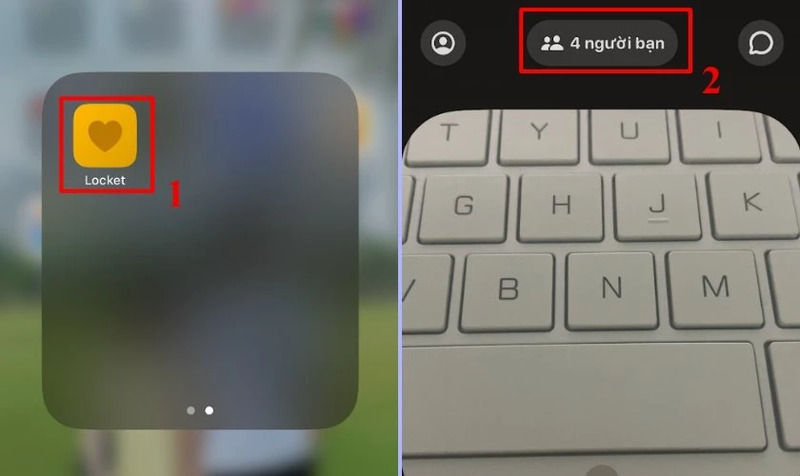
Step 2: Navigate to the “Find friends from other apps” section, where suggestions appear for integrations with services like Instagram, Messenger, SMS, and a direct link option.
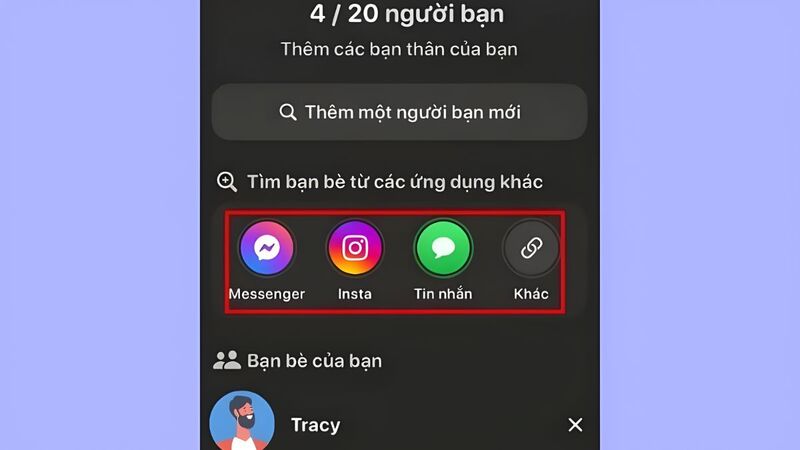
Step 3: Choose your preferred invitation style:
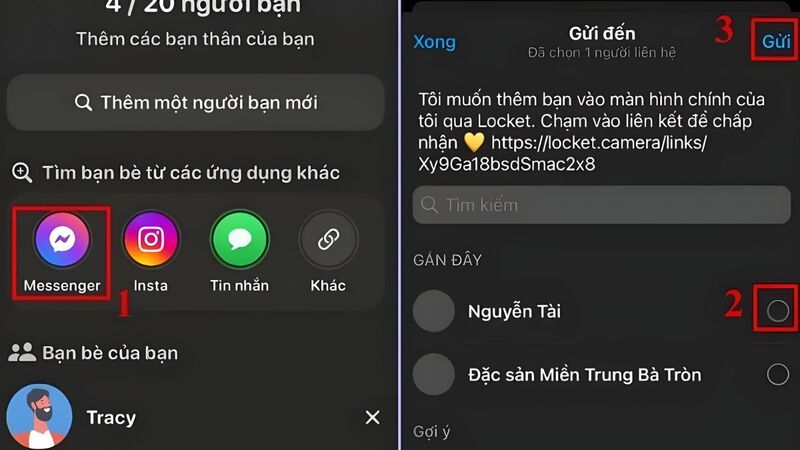
- Select an integrated app icon (e.g., Instagram or Messenger), then tap “Send” to forward the Locket invitation link directly to your contact.
- Alternatively, tap the link icon, copy the unique invitation URL, and paste it into any messaging platform of your choice for broader reach.
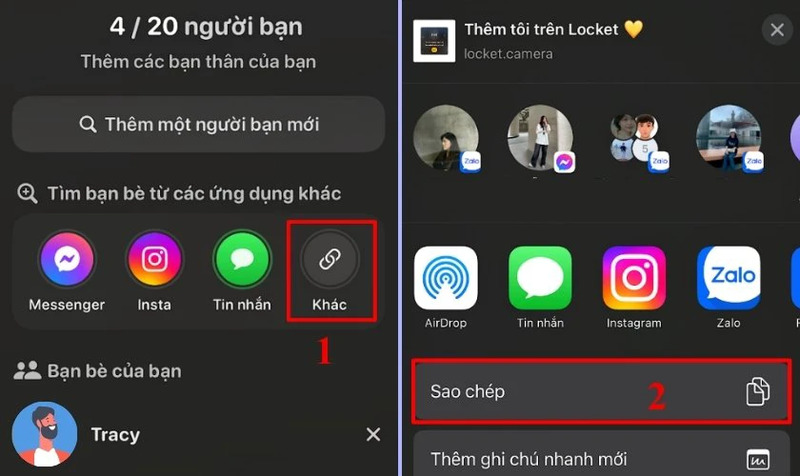
This link-based approach is ideal for coordinating with friends across different ecosystems, ensuring seamless onboarding.
Connecting via Phone Contacts
For quicker additions from your existing address book:
Step 1: Open Locket and tap the “Friends” icon in the upper-right area of the home screen.
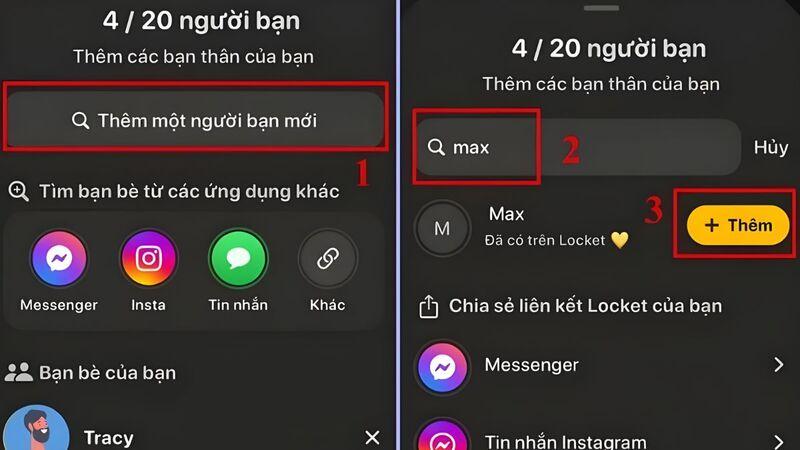
Step 2: In the “Add a new friend” search bar, type the name as saved in your contacts. Once the profile appears, tap “Add” to send the request.
Important Note: Grant Locket permission to access your contacts during initial setup or via device settings. Without this, search results will remain empty.
This contact-sync method excels for rapidly building circles with frequent real-life contacts.
Removing Friends from Your Locket Circle
Relationships evolve, and Locket makes adjustments effortless.
Step 1: From the main screen, select the “Friends” tab.
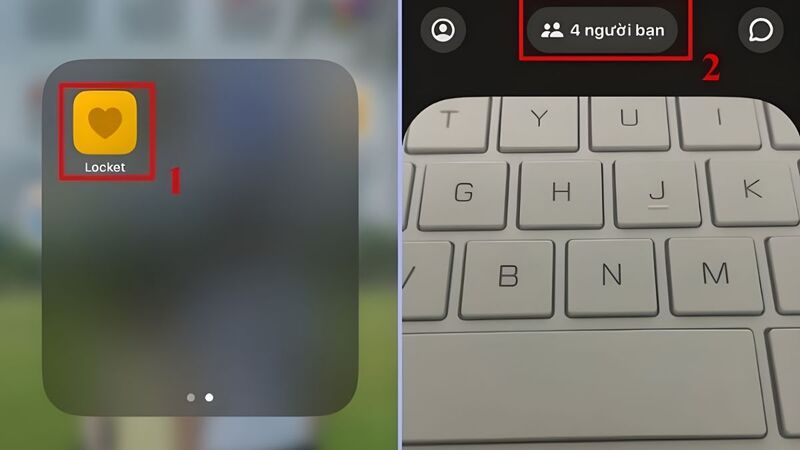
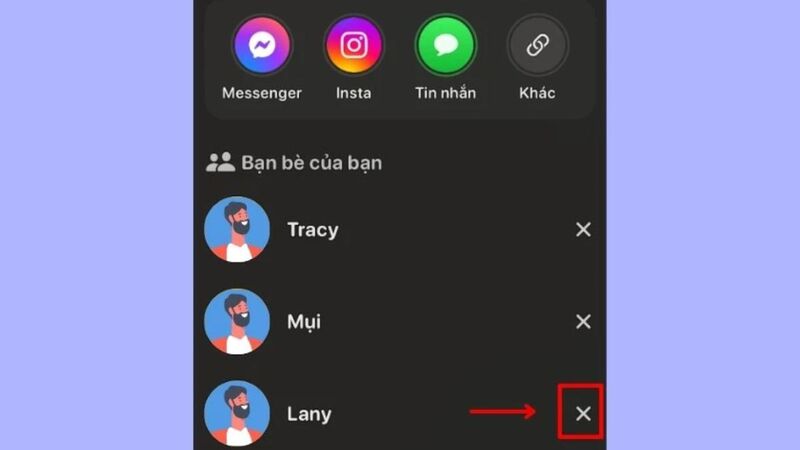
Step 2: In the displayed list, locate the contact and tap the “X” icon beside their name.
Step 3: Confirm by tapping “Remove” in the popup dialog.
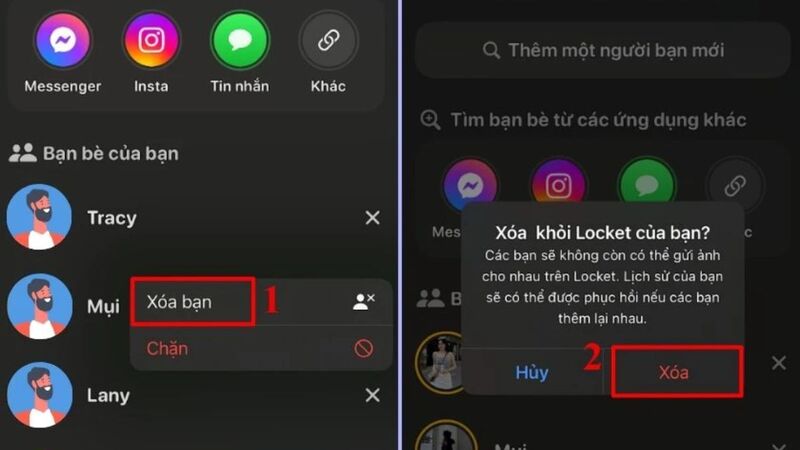
Removals are mutual and immediate—photos cease appearing on both sides without notifications, preserving discretion.
Friend Limits in the Standard Locket Experience
The free version of Locket caps connections at 20 friends per account. This intentional restriction encourages intentionality, ensuring your widget remains a curated space for truly significant relationships rather than a crowded feed. It promotes quality over quantity, aligning with the app’s ethos of intimate sharing.
Users appreciate this boundary as it prevents dilution of meaningful interactions. When the limit is reached, removing existing connections frees slots for new ones, allowing natural evolution of your circle over time.
Expanding Connections Beyond the Standard Limit
While the base app enforces the 20-friend cap, creative workarounds enable broader outreach without immediate upgrades:
Step 1: Open Locket and tap the friend count indicator in the top-left corner.
Step 2: Access friend-finding tools and select preferred sharing methods or the generic link option.
Step 3: Distribute your personal invitation link publicly—via group chats, bios, or stories—allowing interested parties to add you proactively.
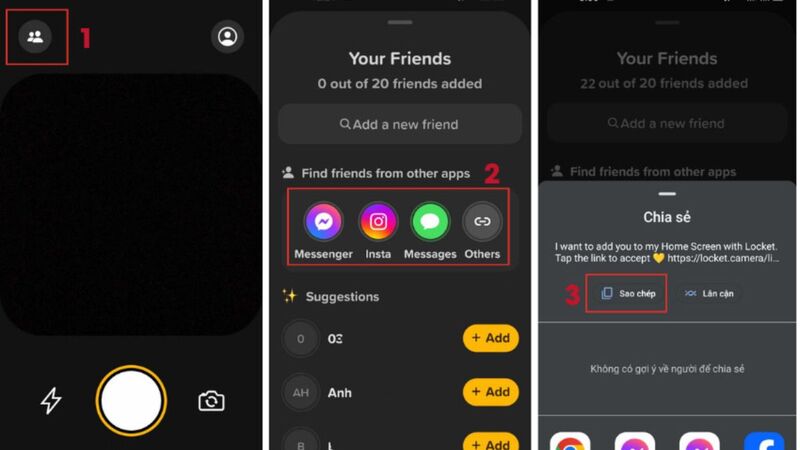
This reverse-invitation strategy effectively bypasses outgoing limits, as recipients initiate connections. For truly unlimited bidirectional sharing, consider Locket Gold, which removes caps entirely alongside premium features.
Ultimately, mastering how to add friends on Locket opens doors to richer, more authentic digital relationships. Whether maintaining close family ties or nurturing friendships across distances, the app’s elegant simplicity delivers profound connectivity. Start building your private photo stream today and rediscover the joy of unfiltered, real-time sharing.