

In today’s digital landscape, Chat GPT has become a familiar term for many users. As an advanced virtual assistant powered by artificial intelligence, developed by OpenAI, this tool offers rapid and precise information retrieval and query responses. In this comprehensive guide, we at buyaitools delve into a curated selection of widely used Chat GPT extensions that enhance productivity in professional and educational settings, providing in-depth insights and practical applications.
Exploring the Essentials of Chat GPT
Chat GPT represents a sophisticated AI-driven chatbot engineered by OpenAI, designed to engage in human-like conversations. It facilitates automated dialogues and addresses inquiries across a broad spectrum of subjects with remarkable fluency.
What sets Chat GPT apart is its extensive training regimen. OpenAI’s researchers amassed vast datasets from diverse sources, including books, articles, Wikipedia entries, and encyclopedias authored by humans—amounting to hundreds of millions of documents. This robust foundation enables Chat GPT to deliver swift, accurate answers to queries in virtually any domain. Beyond basic responses, it excels in creative tasks such as composing poetry, drafting essays, translating texts across multiple languages, generating designs, solving mathematical problems, and even writing or debugging code in programming environments. This versatility makes it an indispensable tool for innovators, educators, and professionals seeking efficient solutions.
Purchase affordable Chat GPT Plus accounts at buyaitools

Comprehensive Overview of Essential Chat GPT Extensions for Users
Below, we present an extensive compilation of popular Chat GPT extensions that streamline various tasks. These tools leverage AI to boost efficiency, offering innovative ways to handle daily challenges in work and study. We’ll explore each one in detail, including setup instructions, key features, real-world applications, potential benefits, and tips for optimal use, ensuring you gain a thorough understanding to integrate them seamlessly into your routine.
Saving Chat GPT Conversation Histories as MD Files or PNG Images
As an intelligent chatbot, Chat GPT excels in processing natural language, responding to a wide array of questions with depth and relevance. If you’ve engaged in a particularly insightful discussion or gathered critical data that you’d like to preserve for future reference, there’s a straightforward method to archive these interactions.
To begin, export your conversation in formats like PDF, PNG, or HTML. Then, navigate to the GitHub repository at https://github.com/lencx/ChatGPT to download the dedicated Chat GPT application. This open-source tool is compatible with various operating systems, making it accessible for Windows, macOS, and Linux users. The installation process is user-friendly, typically involving a simple download and setup wizard that guides you through the necessary steps.
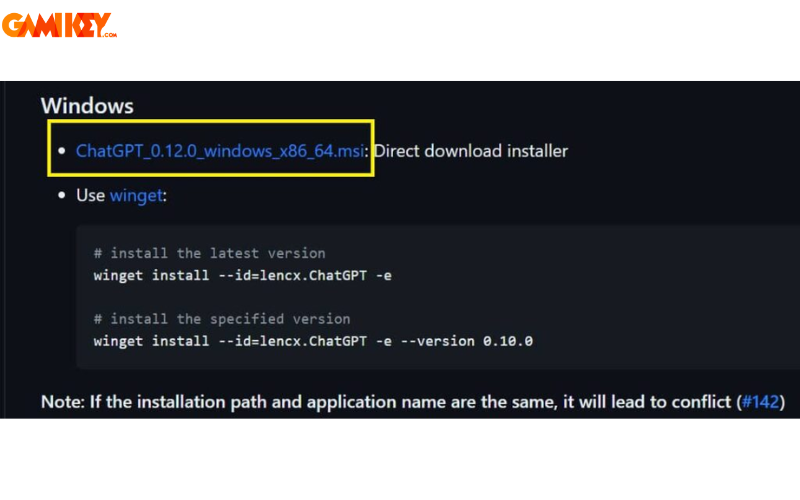
Once installed successfully, log in to your account and scroll to locate the export icons. These intuitive symbols allow for versatile saving options, catering to different needs such as portability or visual representation. For instance, choosing the MD file format ensures compatibility with any text editor, enabling easy editing and markup. PNG exports capture the conversation as an image, ideal for quick shares on social media or presentations, while PDF provides a professional, printable document.
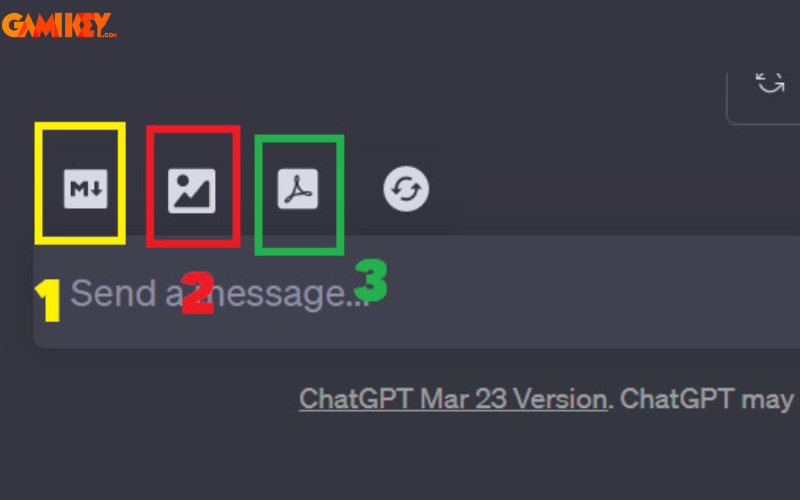
This archiving feature not only preserves valuable insights but also facilitates collaboration. Imagine sharing a detailed AI-generated strategy session with colleagues or revisiting a complex problem-solving thread during exams. By integrating this into your workflow, you can build a personal knowledge base, reducing redundancy and enhancing long-term productivity. Moreover, it’s particularly useful for researchers who need to document evolving ideas or for educators compiling lesson materials from interactive sessions.
Condensing YouTube Video Content Using Chat GPT
For those constrained by time or preferring concise overviews rather than lengthy videos, Chat GPT offers a game-changing solution through the YouTube Summary extension. This free browser add-on empowers users to generate succinct summaries of video content effortlessly.
Upon viewing an engaging YouTube clip, the extension automatically analyzes the transcript and produces a structured summary. This typically includes main titles, subheadings, and key quotes, distilling the essence without requiring you to watch the entire piece. It’s especially beneficial for extended videos with intricate topics, such as tutorials, lectures, or documentaries, allowing you to grasp core ideas in minutes rather than hours.
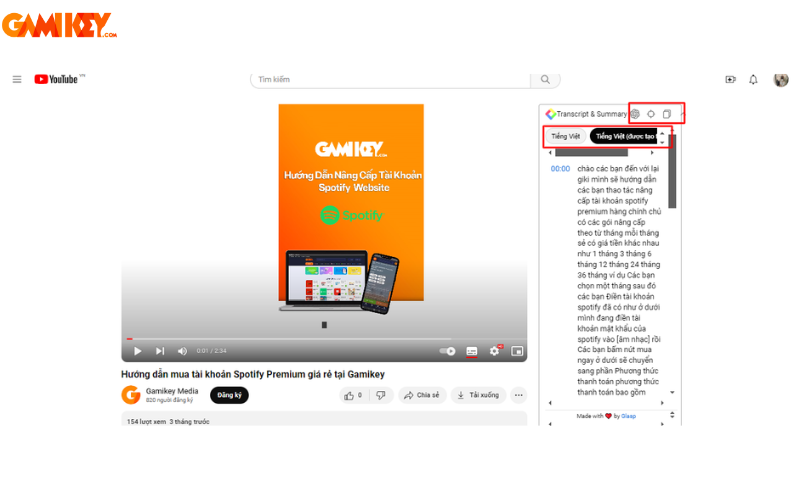
Professionals in fields like marketing can use this to quickly review competitor analyses, while students benefit from rapid study aids. The tool’s accuracy stems from Chat GPT‘s natural language understanding, ensuring summaries are coherent and contextually relevant. To maximize its potential, combine it with note-taking apps for annotated overviews, or integrate it into research workflows to accelerate information gathering. Potential drawbacks include occasional misses on nuanced details, so verifying with the original video for critical applications is advisable. Overall, this extension transforms passive viewing into an active, time-efficient learning experience.
Enhancing Prompt Lists with AIPRM for Chat GPT
AIPRM for Chat GPT stands out as a valuable browser extension that aids in organizing work plans, overseeing projects, and tracking progress via AI-driven interactions. It streamlines complex tasks by providing structured prompts tailored to specific needs.
Furthermore, this tool excels in analyzing potential customer data and target markets, helping users identify key keywords and relevant content for products or services. For SEO enthusiasts, AIPRM offers strategic recommendations, including optimized page structures and ranking improvements on search engines. With a single click, access curated prompt templates for SEO and marketing, complete with detailed analyses to refine your digital presence.
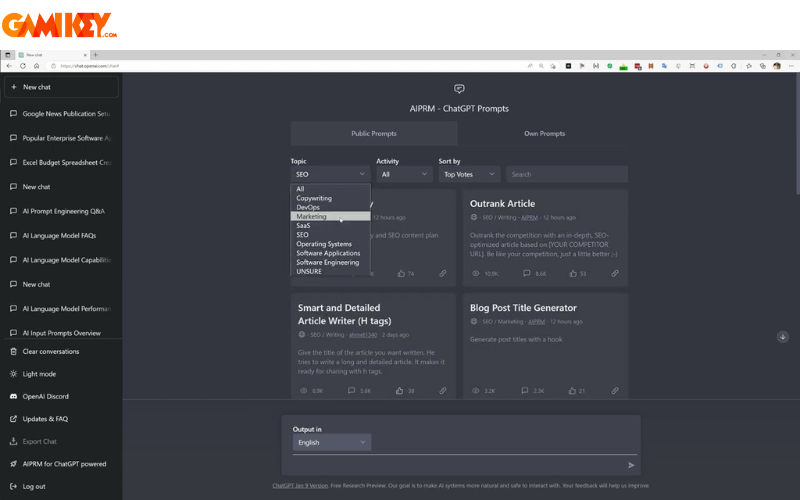
In practice, marketers can leverage AIPRM to brainstorm campaign ideas, while content creators use it to generate outlines. Its community-driven prompt library fosters collaboration, allowing users to share and adapt templates. To get started, install from the Chrome Web Store, link your Chat GPT account, and explore categories like content creation or data analysis. Regular updates ensure it stays relevant, but users should customize prompts for best results. This extension ultimately empowers users to harness AI more effectively, turning vague ideas into actionable strategies.
Integrating Chat GPT into Google Sheets and Docs
The integration of Chat GPT with Google Sheets and Docs via a dedicated extension revolutionizes document and data management. This add-on connects seamlessly, enabling users to brainstorm ideas, plan projects, translate languages, edit texts, and summarize information directly within Google’s ecosystem.
Customization is key, with simple functions like =GPT for cell-specific outputs or =GPT_LIST for row-based lists. This flexibility addresses diverse challenges, from generating blog post concepts to drafting comprehensive guides or condensing reviews.
- Brainstorming blog article ideas with AI-assisted creativity.
- Crafting detailed content or instructional materials effortlessly.
- Summarizing product reviews for quick insights.
- Simplifying SEO tasks with metadata generation, including titles and descriptions.
- Developing content outlines for social media pages or websites.
- Suggesting stylistic modifications to enhance text appeal.
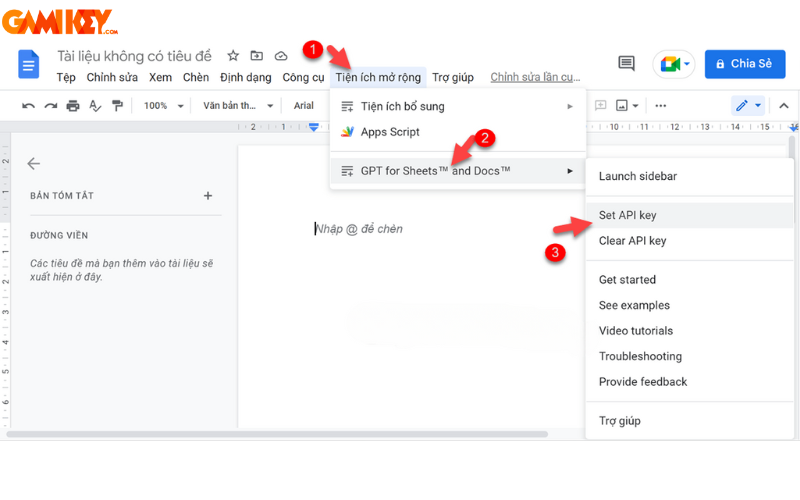
For businesses, this means faster report generation; for writers, it accelerates editing cycles. Installation involves adding it from Google’s marketplace, authorizing access, and experimenting with formulas. Advanced users can combine it with scripts for automated workflows. While it boosts efficiency, ensuring data privacy and verifying AI outputs for accuracy remain crucial. This integration exemplifies how Chat GPT bridges productivity gaps in collaborative environments.
Commanding Chat GPT Via Voice Input
Given its advanced AI capabilities, Chat GPT interprets human speech naturally, making voice commands a practical feature. By holding the spacebar while speaking—after granting microphone access—you can converse fluidly without typing limitations.
This voice functionality promotes seamless interactions, ideal for multitasking or accessibility needs. It’s limited to active chat windows, ensuring focused use. Users in noisy environments might prefer quiet settings for accuracy, and practicing clear enunciation enhances results. From dictating notes to brainstorming ideas hands-free, this extension elevates user experience, making AI more intuitive and inclusive.

Chat GPT as an Alternative Search Engine Solution
Chat GPT serves as a viable alternative to conventional search engines like Google or Bing, delivering prompt, precise answers to diverse queries.
Debates continue on whether it fully replaces traditional tools, depending on user preferences. Those favoring conversational interfaces may prefer Chat GPT over link-based results, appreciating its synthesized information. However, for in-depth research, combining both yields comprehensive outcomes. Its strengths lie in contextual understanding, making it superior for complex explanations or creative queries.
Role-Playing Features in Chat GPT for User Simulations
In certain scenarios, users employ Chat GPT for role-playing, instructing it to embody specific characters in scripted interactions, fostering engaging simulations.
For example, simulating a student-teacher discussion on essay presentations can provide feedback, questions, and evaluations. While impressive in accuracy, it may lack real emotional depth, prompting concerns about over-reliance on AI for interpersonal skills. Nonetheless, it’s valuable for practice in safe, controlled environments.
Generating and Debugging Code with Chat GPT
A favored feature among developers is Chat GPT‘s ability to produce code snippets and identify bugs, though users should possess programming knowledge to validate outputs.
It also aids in error detection and learning new concepts by analyzing submitted code, explaining issues, and suggesting fixes. This accelerates debugging processes, making it a staple for coders.
