

As a leading productivity suite, Microsoft Office 2019 represents a significant evolution from its predecessor, Office 2016. This edition introduces enhanced tools and improved performance, ensuring seamless compatibility across Windows and macOS platforms. For those exploring what Microsoft Office 2019 entails and whether it meets modern needs, this comprehensive guide from buyaitools delves into its core aspects, benefits, and practical insights.
Exploring the Essentials of Microsoft Office 2019
Launched by Microsoft in 2018, Microsoft Office 2019 stands as a robust collection of productivity applications designed to boost efficiency in professional and personal settings. This version emphasizes advanced collaboration capabilities, enabling teams to work more effectively together. Key enhancements include real-time co-authoring, where multiple users can edit documents simultaneously and observe changes instantly, fostering a dynamic workflow.
Additionally, file sharing has been streamlined through integration with OneDrive or direct email options, making it simpler to distribute materials without compatibility issues. Users can also incorporate comments and annotations directly into files, facilitating clear communication of ideas and feedback during group projects.
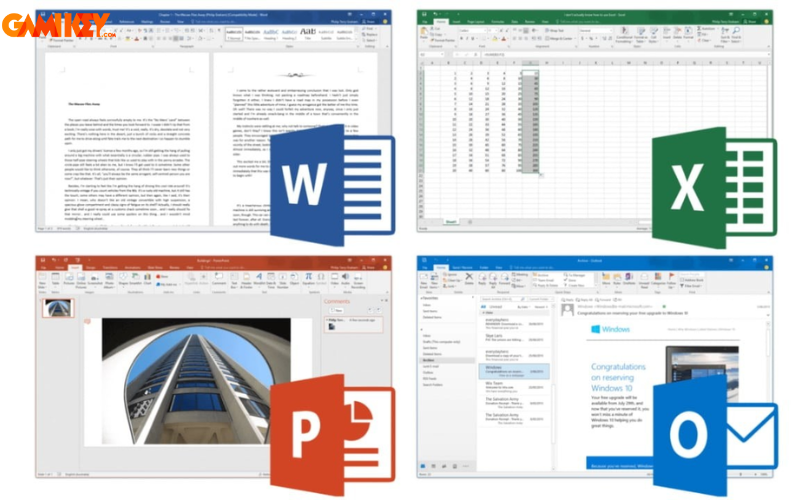
The user interface has undergone refinements, featuring updated icons and a more intuitive layout that reduces the learning curve and enhances usability. Beyond these, Microsoft Office 2019 introduces specialized features across its core applications: Word gains advanced drawing tools and text-to-speech conversion for better accessibility; Excel offers new data analysis functions and visualization charts; PowerPoint includes innovative transitions, visual effects, and video creation tools; while Outlook provides enhanced email management and seamless integration with other software.
- Real-time Collaboration: Enables simultaneous editing with live updates visible to all participants.
- Effortless File Sharing: Quick distribution via cloud storage or email attachments.
- Annotation Tools: Add notes and comments for effective team discussions.
- Word Enhancements: New editing features for images and voice synthesis.
- Excel Upgrades: Advanced analytics and graphical representations.
- PowerPoint Innovations: Dynamic animations and presentation exporting to video.
- Outlook Improvements: Better organization and connectivity with external apps.
These updates make Microsoft Office 2019 a versatile choice for diverse tasks, from document creation to data management, ensuring users stay productive in an increasingly digital world. Its focus on stability and cross-platform support further solidifies its value, especially for those transitioning from older versions.
To truly appreciate Microsoft Office 2019, consider its role in modern workflows. Unlike subscription-based models like Microsoft 365, this is a one-time purchase, appealing to users who prefer perpetual licenses without ongoing fees. This model ensures long-term access to features without the need for constant internet connectivity, making it ideal for offline environments or budget-conscious organizations. Moreover, the suite’s emphasis on security updates helps protect against vulnerabilities, providing peace of mind in data-sensitive tasks.
In educational contexts, Microsoft Office 2019 empowers students with tools for research papers, data analysis projects, and multimedia presentations. Professionals in business can leverage its capabilities for financial modeling, client communications, and strategic planning. The integration of accessibility features, such as improved screen reader support and high-contrast modes, broadens its appeal to users with diverse needs, promoting inclusivity in digital productivity.
What Innovative Features Does Microsoft Office 2019 Bring to the Table?
Building on the foundations of prior releases, Microsoft Office 2019 allows for the creation, modification, and management of documents, spreadsheets, and presentations with greater sophistication. This iteration incorporates a range of novel functionalities that elevate user experience and productivity. For instance, visual aids are enhanced through scalable vector graphics (SVG), which enable documents, worksheets, and slides to incorporate high-quality, resizable images without loss of clarity, making content more engaging and professional.
Another standout addition is the LaTeX equation support, which streamlines the insertion of complex mathematical formulas directly within the applications, eliminating the reliance on external tools. This is particularly beneficial for academics, engineers, and scientists who frequently deal with technical notations.
The Zoom navigation feature revolutionizes presentation handling, allowing users to jump between slides non-linearly during sessions, adapting to audience questions or shifting focuses effortlessly. Furthermore, digital inking capabilities permit the use of stylus devices, like Surface pens or Bluetooth-enabled ones, to advance slides or annotate content on the fly, transforming presentations into interactive experiences.
Ink-to-shape conversion takes handwriting recognition to new heights, automatically transforming handwritten notes into polished shapes, equations, or highlighted text. This functionality supports input via finger, pen, or mouse, offering flexibility for creative tasks and note-taking in meetings or lectures.
- Scalable Vector Graphics Integration: Incorporate and manipulate high-resolution visuals that adapt to any size without quality degradation, perfect for professional reports and infographics.
- LaTeX Equation Editor: Seamlessly create and edit mathematical expressions inline, saving time for technical document preparation.
- Zoom for Flexible Navigation: Customize slide order during presentations to respond dynamically to real-time needs.
- Digital Pen Controls: Navigate and interact with content using compatible pens, enhancing mobility and engagement in presentations.
- Advanced Inking Tools: Convert freehand inputs into structured elements, facilitating quick diagramming and emphasis in documents.
These features collectively make Microsoft Office 2019 a powerhouse for creativity and efficiency. For example, in PowerPoint, the Morph transition creates smooth animations between slides, simulating motion graphics without advanced skills. Excel’s new functions, like TEXTJOIN and CONCAT, simplify data manipulation, while Word’s Focus Mode minimizes distractions for immersive writing sessions. Such innovations not only save time but also inspire users to explore new ways of expressing ideas.
Delving deeper, Microsoft Office 2019 also optimizes performance with faster load times and improved stability, crucial for handling large datasets or complex documents. Compared to earlier versions, it offers better touch support for tablets and hybrid devices, aligning with the rise of mobile computing. Users in creative fields appreciate the expanded template libraries and theme options, which provide starting points for customized content. For IT administrators, the suite includes deployment tools that simplify installation across networks, reducing downtime in enterprise environments.
Is Microsoft Office 2019 worth it? Absolutely, for those seeking a reliable, feature-rich alternative to cloud-dependent services. It excels in scenarios where data privacy is paramount, as local installations minimize exposure to online threats. Moreover, regular updates from Microsoft ensure compatibility with emerging file formats and hardware, extending its lifespan. In summary, these features position Microsoft Office 2019 as a smart investment for sustained productivity.
Common Queries Regarding Installation and Usage of Microsoft Office 2019
Can Microsoft Office 2019 Be Installed on Windows 7?
No, Microsoft Office 2019 is exclusively compatible with Windows 10 and later versions. This restriction stems from the suite’s reliance on modern system architectures and security protocols that are not fully supported in older operating systems like Windows 7 or 8.1. Upgrading your OS is recommended to access its full capabilities.
How Many Editions Are Available in Microsoft Office 2019?
Microsoft Office 2019 primarily offers two consumer-oriented editions, with additional variants for specialized needs:
- Office Home & Student 2019: Tailored for educational and home use, including essential apps like Word, Excel, PowerPoint, and OneNote for basic document handling and note-taking.
- Office Home & Business 2019: Geared toward small businesses, adding Outlook for email, Publisher for design, and Access for databases to the Home & Student lineup.
Other editions include:
- Office Professional 2019: Ideal for advanced users, encompassing all Home & Business tools plus InfoPath, Project, and Visio for form creation, project management, and diagramming.
- Office Standard 2019: Suited for mid-sized organizations, featuring the Home & Business apps along with enhanced Outlook and Publisher functionalities.
Choosing the right edition depends on your specific requirements, such as collaboration needs or advanced data tools.
Frequent Errors During Microsoft Office 2019 Setup and How to Resolve Them
Encountering issues during installation or use is common, but most can be addressed with straightforward troubleshooting:
- Error “0x8007007E”: This typically indicates insufficient administrative privileges. Solution: Log in as an administrator and retry the installation process.
- Error “0x800706BA”: Arises when system requirements aren’t met. Solution: Verify your hardware and OS compatibility against Microsoft’s guidelines before proceeding.
- Error “0xC0000142”: Often due to corrupted installation files. Solution: Redownload the setup package from a trusted source and attempt reinstallation.
Beyond these, users might face activation problems, which can be fixed by ensuring a valid product key and stable internet connection. For performance lags, updating drivers or closing background apps often helps. If errors persist, consulting Microsoft’s support resources or community forums provides additional guidance tailored to your setup.
To expand on troubleshooting, consider preventive measures like running compatibility checks prior to installation. For macOS users, ensure the system is on a supported version, as Microsoft Office 2019 requires macOS Sierra or later. Common post-install issues include font rendering problems, which can be mitigated by updating the suite or adjusting display settings. In enterprise settings, group policy configurations might interfere, so IT teams should review permissions. Overall, understanding these FAQs equips users to maximize the suite’s potential while minimizing disruptions.
We trust this detailed overview has clarified what Microsoft Office 2019 offers and its overall merits. For more insights, explore the “Software” section on buyaitools, packed with valuable resources.
>>> Discover related articles:
What is WPS Office? How to Use WPS Office
Understanding MS Office
How to Uninstall WPS Office
Restoring Microsoft Office
Continuing our deep dive into Microsoft Office 2019, let’s examine its system requirements in greater detail to ensure optimal performance. For Windows users, a minimum of Windows 10 is essential, paired with at least 4 GB of RAM (though 8 GB is recommended for heavier tasks), a 1.6 GHz processor, and 4 GB of available disk space. On macOS, versions 10.12 or newer are supported, with similar hardware specs. Graphics capabilities should include DirectX 9 or later for enhanced visual features like 3D transitions in PowerPoint.
Why does this matter? Meeting these specs prevents sluggish operation and ensures all features, such as real-time collaboration, function smoothly. For instance, inadequate RAM might cause delays in Excel when processing large datasets, while an outdated OS could block installation entirely. Users with older hardware may need upgrades, but the investment pays off in productivity gains.
Comparing Microsoft Office 2019 to Microsoft 365 highlights key differences. While the latter offers continuous updates and cloud storage, Microsoft Office 2019 provides a static, one-time license that’s cost-effective for users not needing the latest bells and whistles. This makes it suitable for small businesses or individuals who value ownership over subscriptions. However, it lacks some cloud-exclusive features like automatic saving to OneDrive, so hybrid users might combine it with free online tools.
In terms of security, Microsoft Office 2019 includes built-in protections against malware, with options for password encryption and information rights management. This is vital for handling sensitive data, as seen in legal or financial sectors. Regular security patches from Microsoft keep it resilient, though users must manually apply them unlike the automated process in 365.
Customization is another strength; users can tailor ribbons and quick access toolbars to streamline workflows. For example, frequent Excel users might prioritize formula tools, while Word enthusiasts could highlight formatting options. This personalization enhances efficiency, reducing time spent navigating menus.
Accessibility features in Microsoft Office 2019 deserve special mention. The suite supports screen readers like Narrator, offers alt text for images, and includes color filters for color-blind users. These elements make it inclusive, complying with standards like WCAG for web content accessibility. Educators, in particular, benefit from tools that aid students with disabilities, such as dictation in Word for those with motor challenges.
For developers and power users, VBA (Visual Basic for Applications) remains robust, allowing macro creation for automation. This extends the suite’s utility in programming repetitive tasks, like generating reports from Excel data. Integration with other Microsoft products, such as Teams or SharePoint, further amplifies its ecosystem value.
Market reception of Microsoft Office 2019 has been positive, with reviews praising its reliability and feature set. However, some critics note the absence of AI-driven tools found in newer versions, like intelligent suggestions in Word. Despite this, for users prioritizing stability over innovation, it remains a top choice.
To illustrate real-world applications, consider a marketing team using PowerPoint’s new cinematic styles to craft compelling pitches, or a researcher employing Excel’s forecasting functions for trend analysis. These scenarios underscore how Microsoft Office 2019 adapts to various industries, from education to corporate environments.
In conclusion, Microsoft Office 2019 is more than just software; it’s a comprehensive toolkit that empowers users to achieve more with less effort. Whether you’re evaluating its worth or troubleshooting issues, this guide provides the foundation for informed decisions. Explore further to unlock its full potential.