

In the dynamic world of digital design, professionals increasingly rely on powerful tools to craft intuitive and visually stunning user experiences. Among these, Adobe XD stands out as a leading solution for prototyping and interface creation. This comprehensive guide delves deeply into the essence of this innovative software, exploring its capabilities, applications, and advantages for designers worldwide.
Understanding Adobe XD
Adobe XD, developed and maintained by Adobe Inc., is a vector-based user experience design platform specifically engineered for creating high-fidelity prototypes of websites, mobile applications, and other digital interfaces. It has become an indispensable asset for UI/UX designers due to its seamless integration of wireframing, prototyping, and collaboration features within a single environment.
Unlike traditional graphic design tools, Adobe XD prioritizes interactivity and user flow, enabling designers to build clickable prototypes that closely mimic final products. Its extensive library of templates, components, and styles empowers creators to experiment with diverse aesthetics while maintaining consistency across projects. For specialists focused on user experience and interface design, this tool represents a cornerstone of modern workflow efficiency.
Key Features That Define Adobe XD Excellence
The widespread adoption of Adobe XD stems from its robust suite of innovative features that streamline complex design processes and foster creativity.
Prototype Sharing and Collaborative Feedback
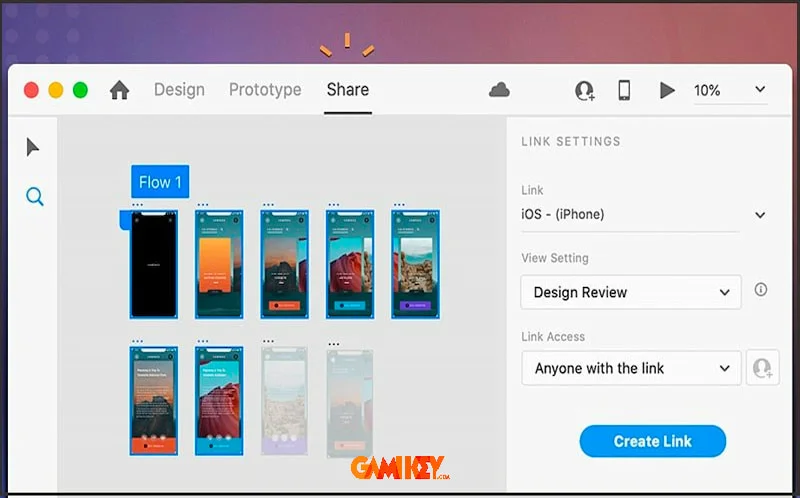
One of the most transformative aspects is the ability to publish interactive prototypes directly for stakeholder review. Designers can generate shareable links that allow reviewers to navigate the prototype as if it were a live application, leaving pinpoint comments on specific elements. This real-time feedback loop dramatically accelerates iteration cycles, reduces miscommunication, and ensures alignment between design vision and client expectations.
Advanced 3D Transform Capabilities
Adobe XD introduces sophisticated 3D transformation tools that enable designers to manipulate objects in three-dimensional space. This functionality opens up possibilities for creating depth-enhanced interfaces, immersive animations, and realistic spatial layouts. By rotating, scaling, and positioning elements along X, Y, and Z axes, creators can prototype experiences that feel more tangible and engaging.
Repeat Grid Functionality
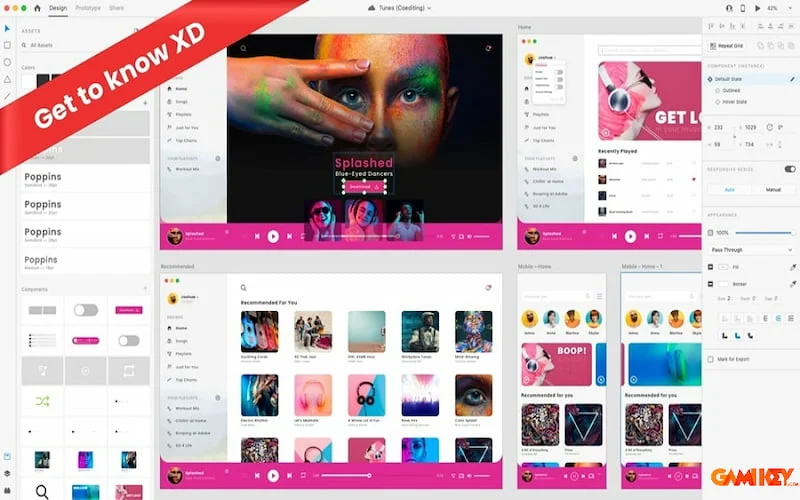
The Repeat Grid tool revolutionizes the creation of repetitive elements such as lists, galleries, and card layouts. Users select a group of objects, activate the grid, and instantly duplicate them horizontally or vertically. Padding, spacing, and content can be adjusted globally with simple drag gestures, ensuring pixel-perfect consistency across hundreds of instances while saving countless hours of manual duplication.
Comprehensive UX Toolset
At its core, Adobe XD excels through its dedicated UX toolkit. Features like auto-animate, component states, and responsive resize allow designers to craft dynamic interactions without coding. Master components ensure that updates propagate instantly across all instances, maintaining design system integrity throughout large-scale projects.
Interactive Prototyping Engine
The prototyping mode transforms static artboards into fully interactive experiences. Designers define triggers (tap, drag, hover, voice) and transitions (slide, dissolve, push) between screens, simulating navigation flows with remarkable fidelity. Previewing on actual devices via the mobile app provides invaluable insights into real-world performance and usability.
Creative Cloud Integration
Deep synchronization with Adobe Creative Cloud libraries means assets, character styles, colors, and components remain consistent across Photoshop, Illustrator, and other Adobe applications. This ecosystem approach eliminates redundant work and guarantees brand coherence in multi-tool workflows.
Motion Design and Auto-Animate
Auto-Animate intelligently interprets differences between artboards and generates smooth micro-interactions automatically. Combined with manual keyframe controls, designers can produce sophisticated animations—parallax scrolling, gesture-based reveals, and component state transitions—that elevate interface personality and guide user attention effectively.
Enhanced Repeat Grid Applications
Beyond basic repetition, grids support data population through drag-and-drop of text or image files, instantly creating realistic content variations. This proves essential for designing e-commerce product listings, social media feeds, or any content-heavy interface requiring authentic placeholder data.
Practical Applications of Adobe XD
Adobe XD serves diverse design needs across industries, proving its versatility in professional environments.
Wireframing, Templating, and Prototyping
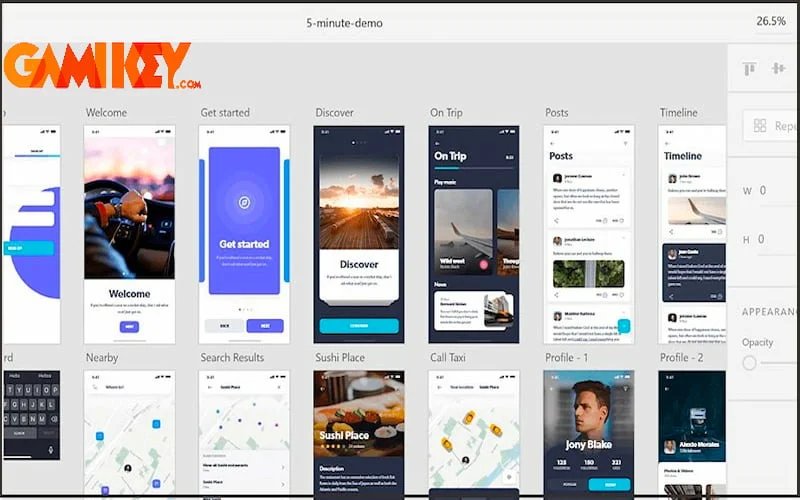
From low-fidelity wireframes outlining basic structure to high-fidelity interactive prototypes, Adobe XD supports every stage of the design process. Multiple artboards facilitate simultaneous exploration of desktop, tablet, and mobile breakpoints, ensuring responsive considerations from inception.
Vector Graphics and Illustration Creation
Powerful vector tools, boolean operations, and path editing enable the creation of custom icons, illustrations, and branding elements directly within the platform. Integration with stock libraries provides instant access to millions of high-quality assets for rapid composition.
Component Variation and Design Systems
Component variants allow designers to define multiple states (hover, active, disabled) and configurations (size, theme) within a single master. Combined with constraints and padding controls, this facilitates scalable design systems that adapt effortlessly to different contexts.
Emerging Technologies: AR and VR Experiences
Forward-thinking features support prototyping for augmented and virtual reality. Anchoring 3D objects, spatial audio cues, and voice commands can be simulated, helping teams validate immersive concepts before development investment.
Advantages of Choosing Adobe XD
- Streamlined Wireframing Process: Intuitive tools demystify layout planning, enabling rapid visualization of information architecture and user journeys.
- Rapid Interface Development: Pre-built UI kits and component libraries accelerate creation of production-ready designs for web and mobile platforms.
- User-Friendly Interface: Clean, focused workspace minimizes learning curve, making advanced features accessible to newcomers and veterans alike.
- Multi-Artboard Management: Simultaneous handling of numerous screens supports complex applications with hundreds of unique states.
- Familiar Navigation for Developers: Keyboard shortcuts and layout paradigms align closely with development environments, easing designer-developer handoff.
- Seamless Online Collaboration: Cloud-based sharing, comment threading, and version history foster efficient team coordination regardless of location.
- Device Preview Accuracy: Mirror prototypes on physical devices for authentic testing of touch interactions and performance.
- Plugin Ecosystem Expansion: Thousands of community plugins extend functionality—from data integration to advanced animation—tailoring the tool to specialized needs.
- Performance Optimization: Lightweight file format and efficient rendering ensure smooth handling of large, intricate projects.
- Regular Feature Updates: Adobe’s continuous development cycle introduces cutting-edge capabilities aligned with industry trends.
Beyond these core benefits, Adobe XD promotes best practices in accessibility design through built-in contrast checking, voiceover support simulation, and keyboard navigation testing—critical considerations in today’s inclusive digital landscape.
The platform’s non-destructive editing approach preserves original assets while allowing bold experimentation. Combined with unlimited undo history and cloud document recovery, designers can iterate fearlessly, pushing creative boundaries without risk of irreversible mistakes.
For enterprises, coediting sessions enable multiple team members to work simultaneously on the same document, with presence indicators showing real-time activity. This live collaboration mirrors modern remote work realities and significantly reduces version conflicts.
Export options cater to diverse needs: developers receive clean CSS snippets, design specs, and assets; marketers obtain optimized images and SVG code; while clients view interactive prototypes without requiring software installation.
In educational settings, Adobe XD‘s starter plan provides full-featured access for students and teachers, democratizing professional-grade tools and preparing the next generation of designers with industry-standard skills.
Ultimately, adopting Adobe XD represents an investment in efficiency, creativity, and collaboration that yields measurable returns through faster time-to-market, higher-quality deliverables, and stronger team synergy.