

In the competitive landscape of modern manufacturing, optimizing factory layouts and production workflows is essential for achieving operational excellence. The Autodesk Factory Design suite emerges as a sophisticated digital solution engineered specifically to empower engineers, architects, and facility planners in conceptualizing, simulating, and refining industrial environments. By seamlessly bridging 2D drafting with immersive 3D modeling, this powerful toolset enables precise visualization of complex production spaces, minimizes design errors, and accelerates decision-making processes. This comprehensive exploration delves into the core capabilities, strategic advantages, and practical implementation of the Autodesk Factory Design utilities, highlighting why it has become an indispensable asset in contemporary industrial design.
Understanding the Autodesk Factory Design Suite
The Autodesk Factory Design Utilities (often abbreviated as FDU) represent an advanced software ecosystem dedicated to the creation and enhancement of factory layouts through integrated 2D and 3D workflows. As a specialized extension within Autodesk’s Product Design & Manufacturing Collection, it harmoniously integrates with flagship platforms such as AutoCAD, Inventor, and Navisworks. This interoperability allows professionals to initiate layouts in familiar 2D environments or dive directly into parametric 3D modeling, with real-time synchronization ensuring consistency across all representations.
At its core, the suite facilitates bidirectional data flow: modifications in a 2D AutoCAD layout automatically generate corresponding 3D assets in Inventor, and vice versa. This dynamic linkage not only preserves accuracy but also streamlines collaboration among multidisciplinary teams, reducing iterations and fostering innovation in facility planning. Whether designing greenfield plants or retrofitting existing facilities, the Autodesk Factory Design suite provides a robust foundation for digital twin creation, enabling stakeholders to explore “what-if” scenarios long before physical implementation.
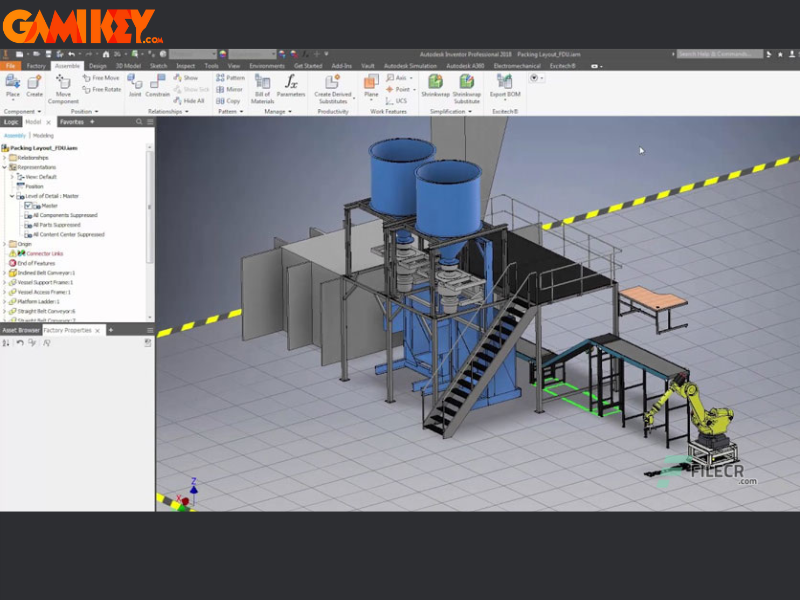
Beyond basic layout tools, the suite incorporates asset libraries populated with parametric models of machinery, conveyors, storage systems, and infrastructure components. These assets can be customized in real time—adjusting dimensions, configurations, and material properties—to align precisely with project specifications. This flexibility is particularly valuable in industries such as automotive, aerospace, consumer goods, and data center development, where space utilization and workflow efficiency directly impact profitability.
Key Capabilities of Factory Design Utilities
The Autodesk Factory Design suite distinguishes itself through a rich array of specialized features tailored to the nuances of industrial facility design. Below is an in-depth examination of its standout functionalities, each contributing to enhanced productivity and superior outcomes.
- Advanced 3D Factory Modeling: Engineers can construct detailed digital replicas of entire production facilities using scalable, editable 3D assets. This capability allows for intuitive placement of equipment, routing of material flows, and evaluation of spatial constraints, providing a crystal-clear perspective that traditional 2D drawings cannot match.
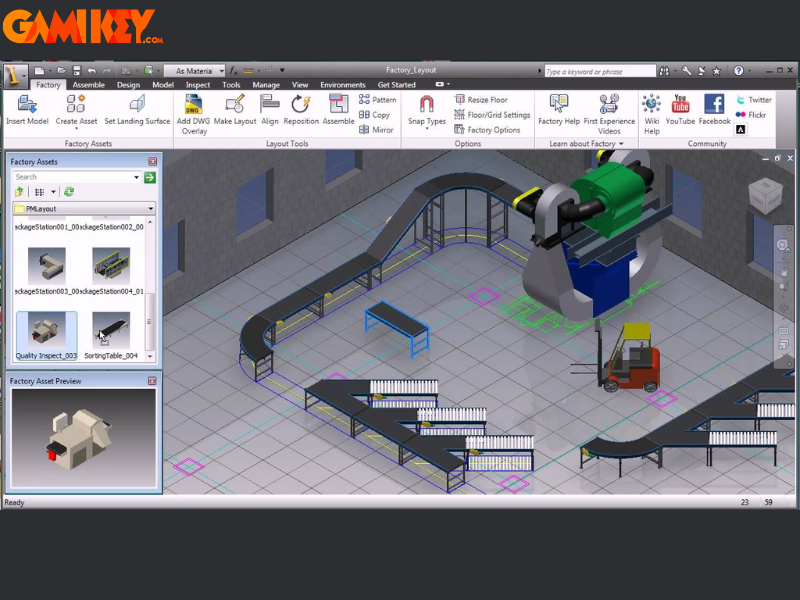
- Production Process Optimization: Integrated Process Analysis tools enable simulation of manufacturing sequences, identifying bottlenecks, cycle time inefficiencies, and resource conflicts. By testing multiple configurations virtually, teams can implement data-driven improvements that enhance throughput and reduce operational costs without disrupting live production.
- Resource and Inventory Management: The software maintains detailed inventories of equipment, materials, and spatial allocations, tracking availability, utilization rates, and maintenance schedules. This holistic oversight ensures designs remain grounded in real-world constraints, preventing overcommitment of resources.
- Seamless Integration Across Autodesk Ecosystem: Native compatibility with AutoCAD for precise 2D drafting, Inventor for parametric part design, and Navisworks for clash detection and project review creates a unified platform. Data flows effortlessly between applications, leveraging the full power of Autodesk’s industrial design tools.
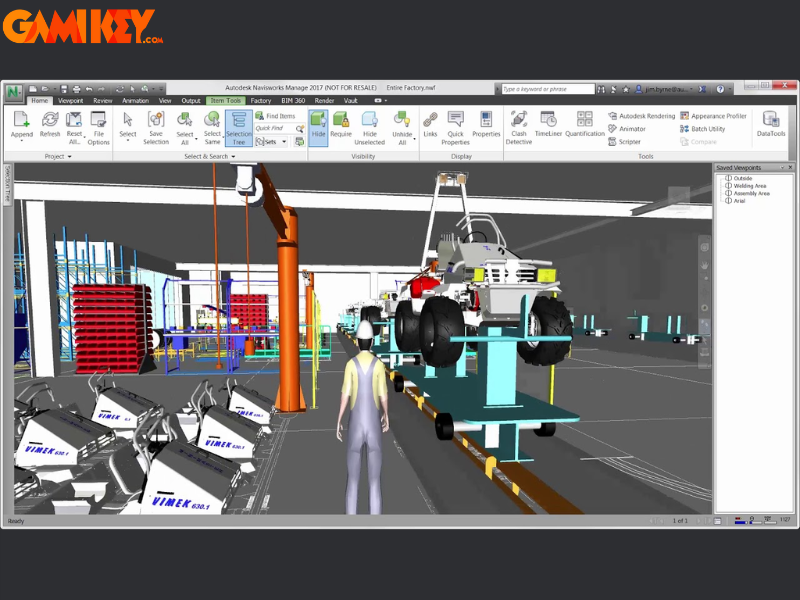
- High-Fidelity Visualization: Advanced rendering and walkthrough capabilities produce photorealistic presentations suitable for stakeholder approvals, investor pitches, or regulatory reviews. These visuals communicate complex spatial relationships with exceptional clarity.
- Change Management and Version Control: Robust auditing features track every modification across 2D and 3D models, maintaining project integrity throughout the lifecycle. Automated updates propagate changes instantly, minimizing discrepancies.
- Precise Equipment Positioning: Intelligent snapping, alignment tools, and clearance checks ensure accurate placement while flagging potential interferences, such as overhead crane paths or maintenance access zones.
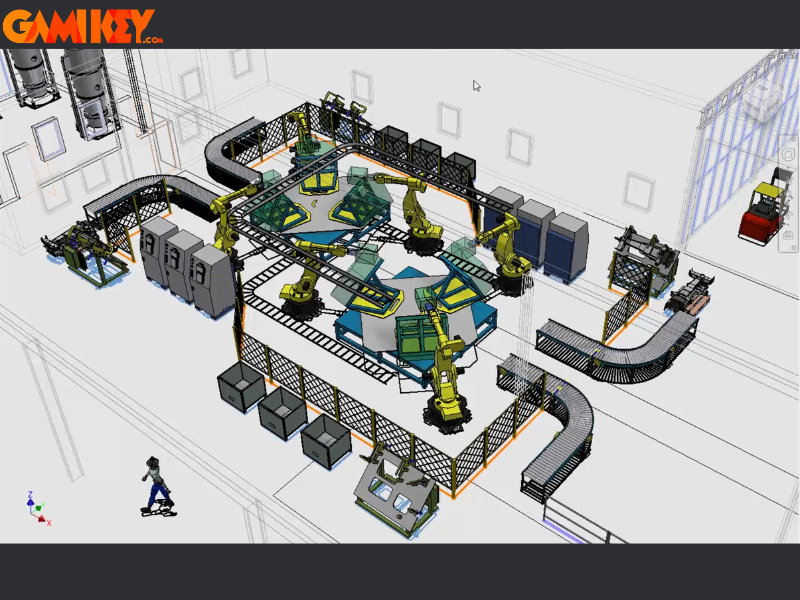
- Comprehensive Reporting and Analytics: Generate customized reports on layout metrics, material handling efficiency, energy consumption estimates, and compliance status. These insights support informed strategic decisions and continuous improvement initiatives.
Collectively, these features position the Autodesk Factory Design suite as a transformative tool that bridges conceptual design with executable reality, driving measurable gains in productivity, safety, and sustainability.
System Requirements for Optimal Performance
To harness the full potential of the Autodesk Factory Design Utilities, systems must meet or exceed the following specifications. These recommendations reflect the demands of handling large-scale 3D assemblies and real-time simulations.
| Component | Recommended Specifications |
|---|---|
| Operating System | 64-bit Microsoft Windows 10 or Windows 11 (latest updates applied) |
| Processor | Multi-core Intel or AMD processor, 3.3 GHz or higher (8+ cores recommended for complex models) |
| Memory (RAM) | Minimum 32 GB; 64 GB or more for large factory layouts |
| Storage | SSD with at least 200 GB free space for installation and project files |
| Graphics Card | Certified workstation GPU with 8 GB VRAM or higher (NVIDIA Quadro/RTX or AMD Radeon Pro series) |
| Additional Software | .NET Framework 4.8 or later; compatible Autodesk platform versions |
Adhering to these guidelines ensures smooth performance, particularly when navigating extensive digital twins or running process simulations.
Disabling Windows Defender Firewall for Installation
During installation of Autodesk products, Windows security features may intermittently block components. Temporarily disabling the firewall facilitates uninterrupted setup (remember to re-enable afterward for system protection).
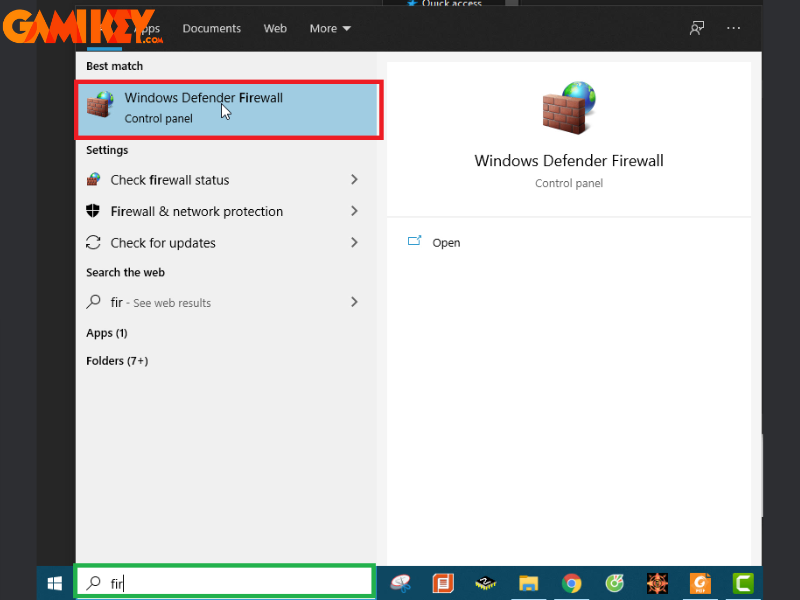
- Step 1: Open the Windows search bar and type “Firewall”. Select Windows Defender Firewall from the results.
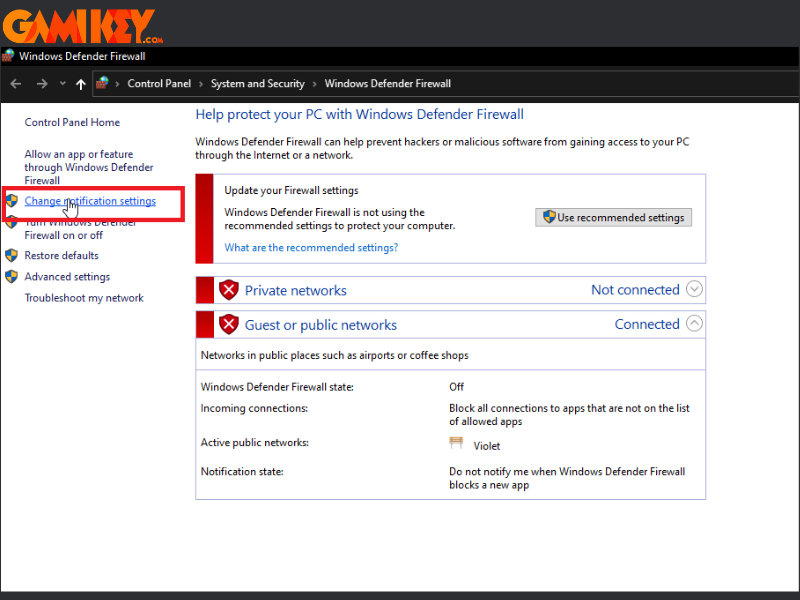
- Step 2: In the left pane, click Turn Windows Defender Firewall on or off.
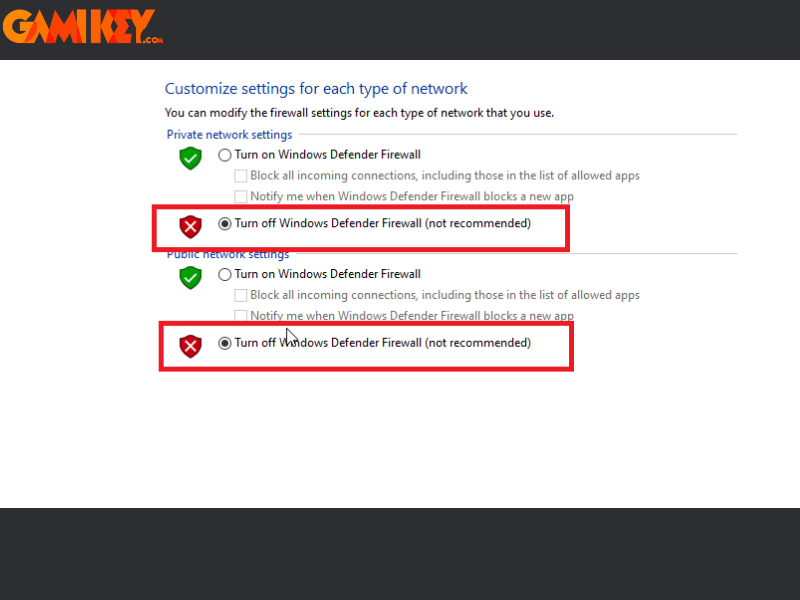
- Step 3: Select Turn off Windows Defender Firewall for both private and public networks, then confirm with OK.
Turning Off Virus & Threat Protection During Setup
Real-time antivirus scanning can sometimes flag legitimate installer files. Disabling protection briefly resolves such conflicts.
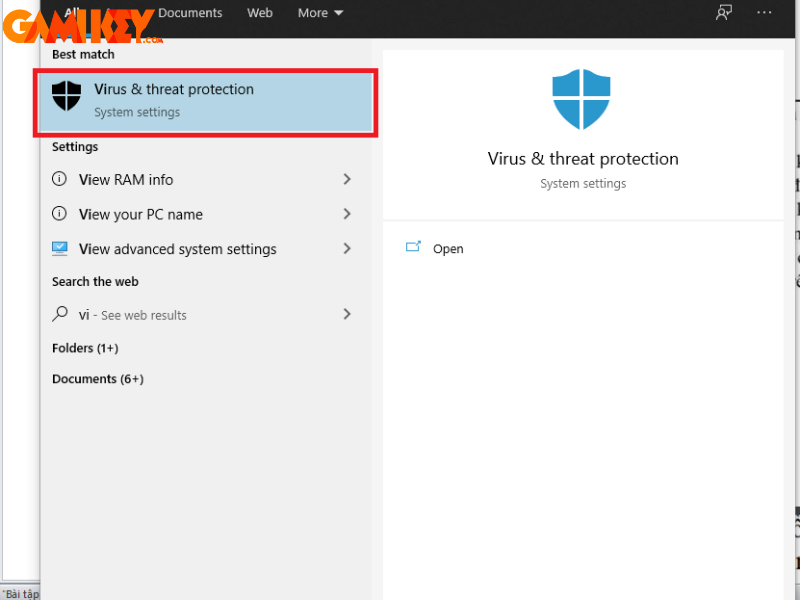
- Step 1: Search for “Virus” and open Virus & threat protection.
- Step 2: Click Manage settings under Virus & threat protection settings.

- Step 3: Toggle off Real-time protection, Cloud-delivered protection, and Automatic sample submission. Confirm any prompts.
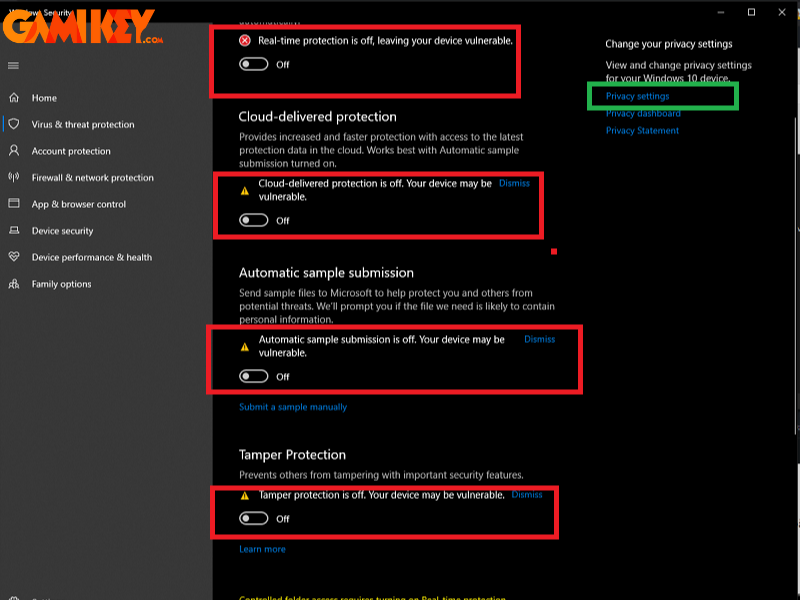
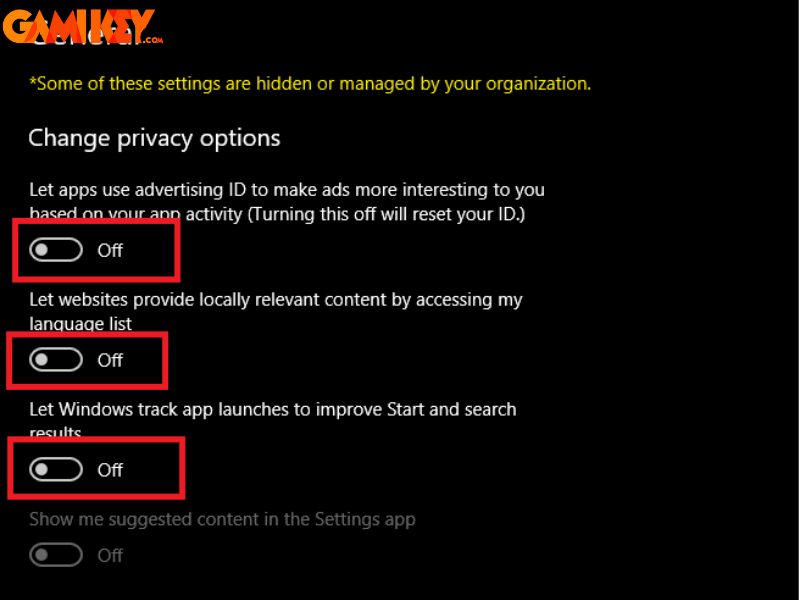
- Step 4: Verify all toggles are off, then proceed with the Autodesk Factory Design installation.
In summary, the Autodesk Factory Design suite stands as a pinnacle of digital innovation in industrial facility planning. Its sophisticated integration of design, simulation, and analysis tools empowers organizations to achieve unprecedented levels of efficiency, safety, and adaptability. For professionals seeking to elevate their manufacturing workflows, this solution offers unmatched depth and versatility, making it a cornerstone of modern industrial engineering practice.
Organizations interested in licensed access to premium Autodesk tools, educational accounts, or professional subscriptions can explore reputable providers offering competitive pricing and authentic software solutions tailored to diverse needs.