

In the rapidly evolving digital landscape, where technology continues to advance at an unprecedented pace, the need for reliable and expansive online storage solutions has become paramount. Individuals and families alike are generating vast amounts of data through photos, videos, documents, and emails. This is where Google One emerges as a comprehensive cloud storage subscription service designed to address these growing demands seamlessly. Offering enhanced capacity beyond the standard free allocation, along with a suite of premium perks, Google One integrates effortlessly with popular Google services. This detailed exploration will delve into the essence of Google One, its standout advantages, available tiers, and how it distinguishes itself from the core Google Drive offering, providing you with all the insights needed to make an informed decision.
Understanding the Core of Google One
Google One represents Google’s premium subscription model for cloud storage, building upon the foundational 15 GB provided free with every Google account. This shared storage spans across essential services such as Google Drive for files, Gmail for emails and attachments, and Google Photos for images and videos. As daily digital activities escalate—capturing high-resolution media, collaborating on extensive documents, or managing professional correspondence—the limitations of the complimentary quota become evident quickly.
By subscribing to Google One, users unlock significantly larger storage pools, ensuring uninterrupted access to their digital assets. Beyond mere expansion, the service introduces value-added benefits that enhance security, collaboration, and overall user experience. It caters to a wide audience, from casual users archiving family memories to professionals handling large datasets, making it a versatile tool in modern cloud computing.
The evolution of Google One reflects Google’s commitment to adapting to user needs. Launched as an upgrade path for storage, it has incorporated advanced features over time, including integration with cutting-edge AI tools in higher tiers. This positions Google One not just as storage but as an ecosystem enhancer for Google’s suite of productivity applications.
Key Advantages and Standout Features of Google One
Google One distinguishes itself through a blend of practical utilities and exclusive perks that go far beyond basic storage augmentation. These elements are crafted to provide convenience, security, and added value, encouraging users to maximize their Google ecosystem investment.
Family Sharing Capabilities
One of the most appreciated aspects is the ability to share subscription benefits with family members. A single plan can extend its storage allocation to up to five additional individuals, totaling six users. Each participant retains private access to their files, ensuring privacy while collectively benefiting from the expanded capacity. This feature simplifies household management of digital content, allowing parents to store children’s school projects, family vacation photos, or shared backups without multiple individual subscriptions. Setup is straightforward via the family group settings, promoting efficient resource utilization without compromising personal boundaries.
This sharing extends to most perks, making Google One an economical choice for multi-user households. It fosters collaboration on shared albums in Google Photos or joint document editing in Drive, all under one unified billing structure.
Access to Dedicated Expert Assistance
Subscribers gain priority access to Google’s knowledgeable support team, available around the clock. Whether troubleshooting storage issues, resolving sync problems, or seeking advice on optimizing Google Photos editing tools, experts are reachable through multiple channels including chat, email, or phone. This level of responsive help is particularly valuable for non-technical users or during urgent situations, such as recovering accidentally deleted files.
The support extends across various languages, accommodating a global user base. For complex queries involving integration with other Google services, this direct line to specialists can save considerable time and frustration compared to standard help forums.
Advanced AI Integrations in Premium Tiers
Higher-level plans, particularly those incorporating AI enhancements, provide access to powerful tools powered by Gemini models. Users can leverage advanced photo editing with unlimited Magic Editor uses, generate creative content, or utilize AI for productivity in Docs, Sheets, and Gmail. These capabilities include sophisticated image manipulation, video creation aids, and intelligent assistance for research or writing tasks.
Such integrations transform Google One into a hub for creative and professional workflows, appealing to content creators, students, and businesses seeking efficiency gains through artificial intelligence.
Additional Perks and Enhancements
Depending on the tier, subscribers may enjoy rewards like cashback on Google Store purchases, premium features in Google Workspace for superior collaboration, or extended functionalities in smart home integrations. These extras add tangible value, turning a storage subscription into a multifaceted benefit package.
Current Subscription Tiers and Options for Google One
Google One offers flexible plans tailored to varying storage requirements and feature preferences. Pricing is competitive, with options for monthly or annual billing—the latter often providing savings. Plans generally start with the Basic tier and scale up to include AI-powered enhancements.
- Basic (100 GB): Ideal for light to moderate users needing a boost over the free 15 GB. It includes family sharing and core benefits at an affordable entry point.
- Premium (2 TB): A popular choice offering substantial space for extensive media libraries, professional files, or family use. Includes additional perks like Google Store rewards and enhanced Workspace tools.
- Google AI Pro (2 TB): Builds on the Premium plan with full access to advanced Gemini AI features, suitable for users leveraging AI in daily tasks.
- Higher Capacities: For power users or enterprises, options extend to larger allocations, often with monthly billing only.
Prices vary by region, and annual commitments can reduce costs significantly. Users should check the official site for localized rates and promotional offers, as these can make upgrading even more appealing.
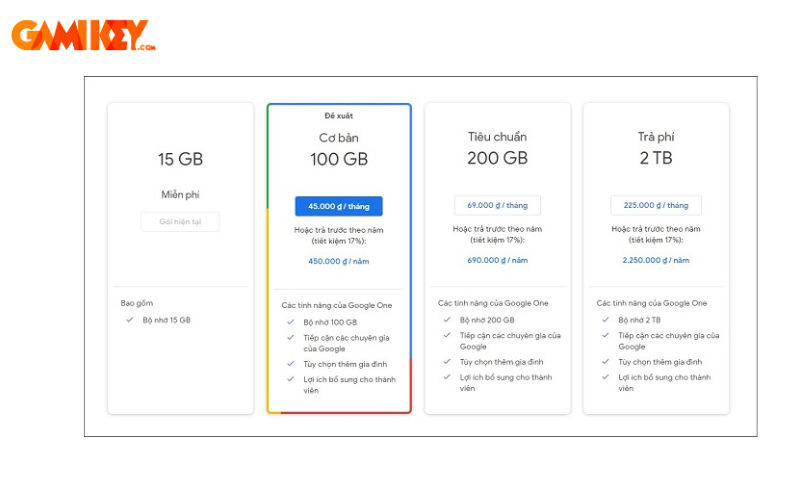
When selecting a plan, consider current usage patterns, anticipated growth in data, and desired extras like AI tools. The scalability allows easy upgrades or downgrades as needs evolve.
Distinguishing Google One from Google Drive
While often conflated, Google Drive and Google One serve complementary roles. Google Drive is the free platform for storing, organizing, and sharing files, complete with the initial 15 GB quota shared across Google services. It excels in real-time collaboration, seamless integration with Docs, Sheets, and Slides, and accessibility across devices.
In contrast, Google One acts as the premium enhancement layer, expanding that storage and bundling exclusive advantages. Essentially, subscribing to Google One amplifies Google Drive’s capabilities without altering its core functionality. Users continue interacting primarily through Drive interfaces, but with greater capacity and perks.
This relationship makes Google One an optional yet highly beneficial upgrade for those outgrowing the free limits. It avoids the need for separate storage solutions, keeping everything centralized within Google’s secure ecosystem.
For most, the transition feels natural, as Google One enhances rather than replaces the familiar Drive experience.
Step-by-Step Guide to Subscribing to Google One
Acquiring a Google One membership is designed to be intuitive, accessible via web or mobile apps.
Accessing the Upgrade Interface
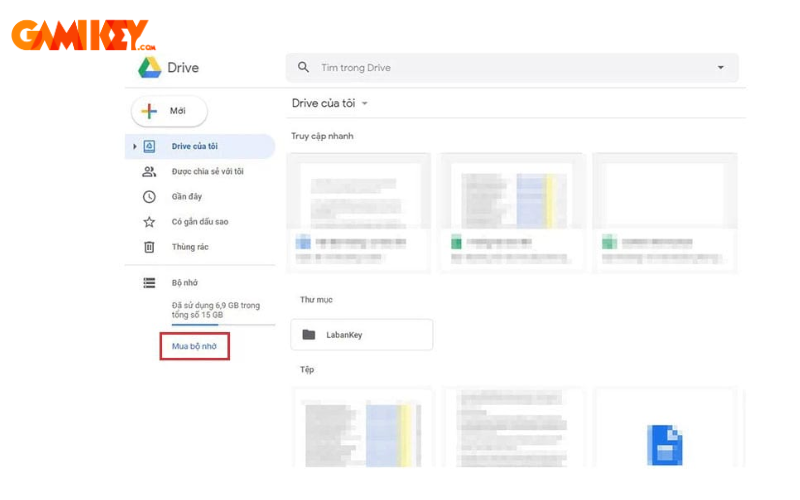
Begin by opening Google Drive on your preferred device—whether through a browser or the dedicated app. Navigate to the storage management section, often visible in the sidebar or settings menu.
Exploring Storage Purchase Options
Locate the prompt for additional storage or upgrade. This will direct you to the Google One dashboard, displaying available plans with details on capacity and inclusions.
Selecting Your Preferred Plan
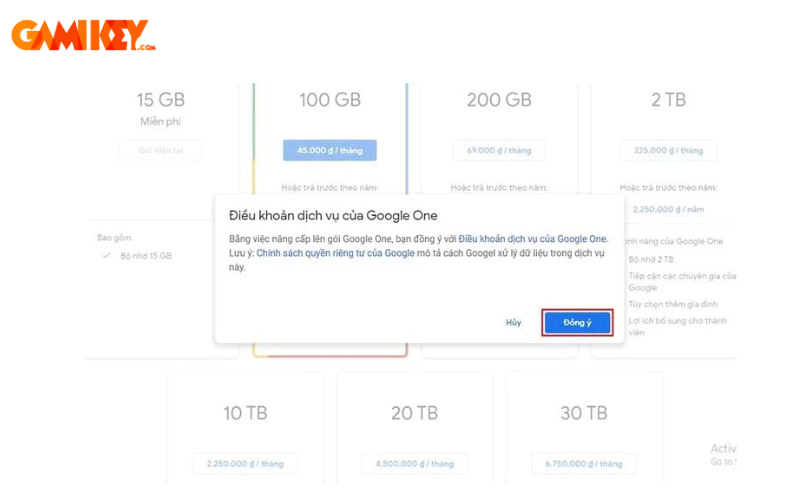
Review the tiers, comparing storage amounts against your requirements. Consider factors like family sharing needs or AI features. Proceed by confirming your choice.
Completing Payment Setup
Enter or select a payment method—Google supports cards, digital wallets, and more. Verify details for smooth processing.
Activation and Enjoyment
Upon successful transaction, storage updates instantly. Explore new features and invite family members if applicable.
This streamlined process ensures minimal disruption, allowing immediate enjoyment of expanded capabilities.
In summary, Google One stands as a robust, feature-rich solution for modern cloud storage needs, blending ample space with innovative perks. Whether safeguarding precious memories, streamlining workflows, or embracing AI advancements, it offers compelling reasons to upgrade. Evaluate your digital habits today and discover how Google One can elevate your online experience.