

Switching to a VPN to mask your IP address is an effective strategy for accessing restricted websites and safeguarding your online privacy. While the process isn’t overly complex, mastering it for optimal results requires understanding each step thoroughly. In this comprehensive guide, we’ll explore how to change VPN settings efficiently, securely, and in an accessible manner, empowering you to succeed on your very first attempt.
Understanding IP Spoofing via VPN
IP spoofing through a VPN, often referred to as VPN-based IP masking, involves leveraging a Virtual Private Network service to alter your actual IP address to one provided by the VPN provider. This technique effectively conceals your real IP on the internet, primarily to enhance privacy, bolster security, or bypass geo-restrictions on content.
Learn more about:
What is VPN and How to Use It?
Enabling/Disabling VPN on iPhone and Android
How Your Location Shifts When You Change VPN
Upon establishing a VPN connection, your device’s IP address is replaced with that of the selected VPN server. This substitution tricks websites and online services into perceiving your location as that of the server itself.
For instance, connecting to a U.S.-based VPN server would make it appear as though you’re browsing from the United States, even if you’re physically in another country like Vietnam. This capability unlocks region-locked content, though it might introduce some latency in connection speeds and doesn’t guarantee absolute anonymity.
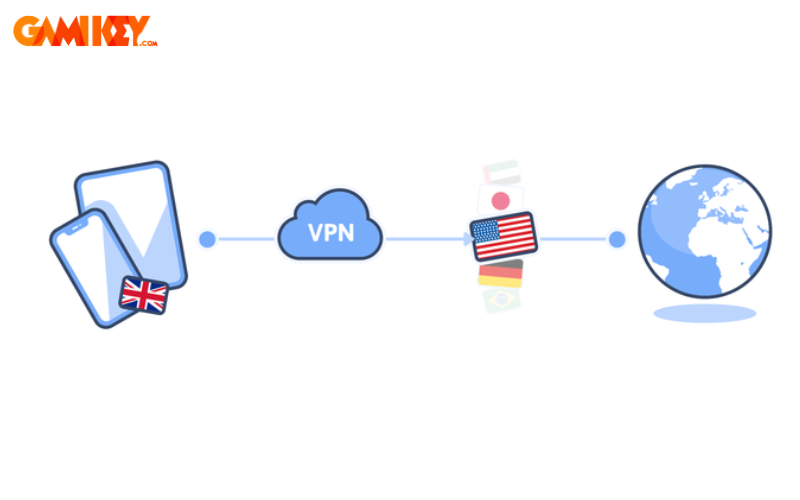
To delve deeper, consider the mechanics behind this process. When you initiate a VPN connection, your internet traffic is routed through an encrypted tunnel to the VPN server. This server then forwards your requests to the destination websites, masking your origin. The result is a virtual relocation of your online presence, which can be particularly useful for travelers, remote workers, or anyone seeking to overcome digital barriers. However, it’s essential to choose a reputable VPN provider to minimize risks such as data logging or weak encryption. Factors like server location, protocol used (e.g., OpenVPN, WireGuard), and the provider’s no-logs policy play crucial roles in determining the effectiveness of this location shift. Additionally, while VPNs excel at IP masking, they may not fully obscure other tracking methods like browser fingerprinting, so combining them with other privacy tools is advisable for comprehensive protection.
Detailed Guide on Spoofing IP with VPN on PCs and Laptops
Altering your VPN configuration on a personal computer or laptop can be straightforward if you follow a structured approach. Below, we’ll outline a method using browser extensions for simplicity, but remember that dedicated VPN software often provides more robust features.
Step 1: Download and install the GeoProxy extension in your Chrome browser. This tool is user-friendly and integrates seamlessly with your browsing experience.
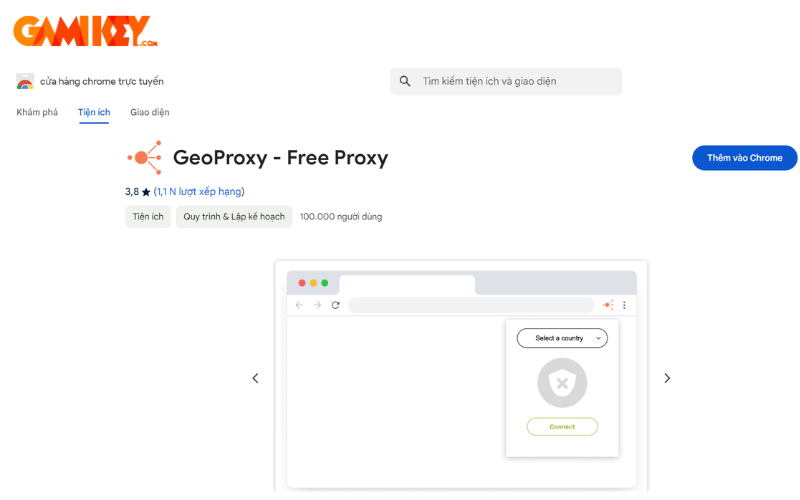
Step 2: Click on the Extensions icon in your browser toolbar and select GeoProxy from the dropdown menu to access its interface.
Step 3: Browse through the available countries and pick the one that aligns with your desired virtual location.
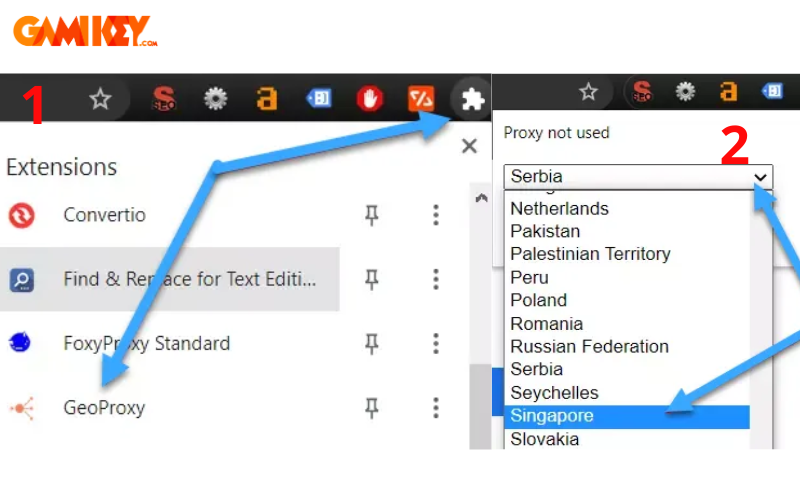
Step 4: Select any available IP address from that country to finalize the connection and start browsing with your new IP.
Expanding on this, using browser extensions like GeoProxy is ideal for quick tasks, but for system-wide protection, consider installing full VPN clients from providers such as ExpressVPN or NordVPN. These offer advanced features like kill switches, which prevent data leaks if the VPN drops, and split tunneling, allowing you to route specific traffic through the VPN while keeping others direct. When selecting a server, prioritize those with low latency and high bandwidth to maintain smooth performance. It’s also wise to test your new IP using online tools to confirm the change. Remember, while free extensions are convenient, premium VPN services provide better reliability, faster speeds, and stronger encryption protocols, reducing the risk of IP leaks or surveillance.
Methods for Changing VPN on Mobile Devices
Switching VPN on Android Devices
Modifying VPN settings on an Android smartphone is a breeze with the right app, requiring just a few taps to get started.
Step 1: Head to the Google Play Store and download Snap VPN, a reliable option for IP masking.
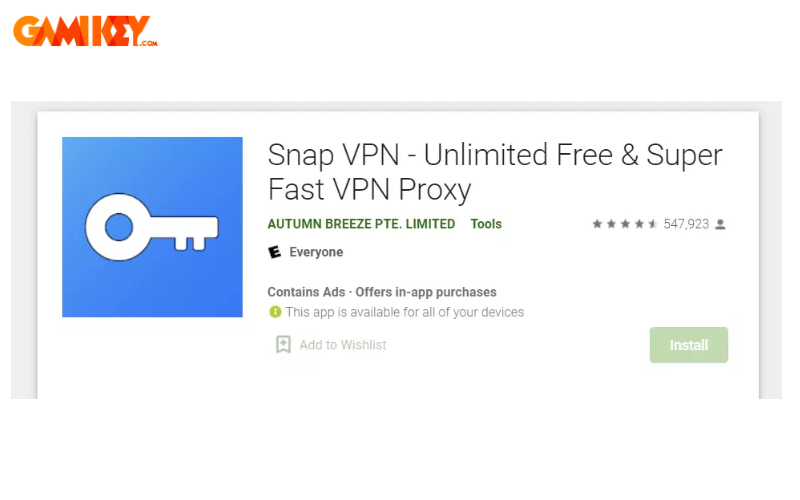
Step 2: Launch the Snap VPN app and grant it the necessary permissions to function properly.
Step 3: Tap on the “Location” option to view and select from a list of countries or servers for your connection.
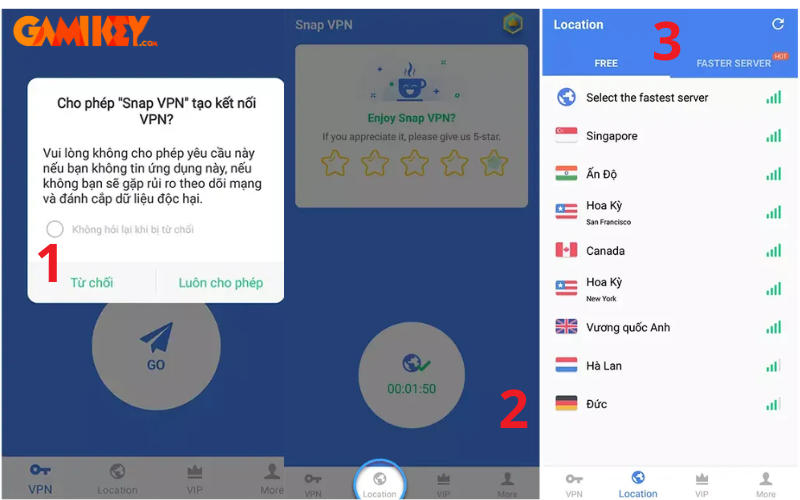
Step 4: Hit the “Go” button to establish the VPN connection and begin using the new IP.
Step 5: Once finished, select “Disconnect” to terminate the VPN session and revert to your original IP.
On Android, VPN apps like Snap VPN are popular due to their ease of use and free tiers, but premium versions unlock faster servers and unlimited data. Android’s built-in VPN support allows manual configuration for protocols like PPTP or L2TP, but apps simplify this. Be cautious of battery drain, as VPNs can consume more power due to encryption. For enhanced security, enable features like auto-connect on untrusted networks. This method is perfect for mobile users needing quick access to geo-blocked apps or secure public Wi-Fi, but always review app permissions to avoid privacy risks.
Altering VPN on iPhone with iOS
Configuring a VPN on an iPhone involves navigating through the device’s settings menu for a seamless integration.
Step 1: Open Settings, then go to General, and select VPN & Device Management to access the relevant options.
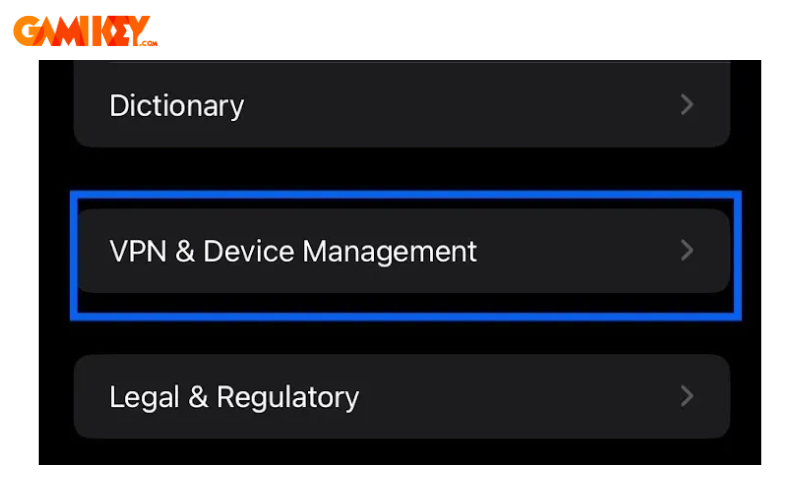
Step 2: Tap on VPN to view installed profiles, including configuration names, VPN types, and connection status.
Step 3: Choose “Add VPN Configuration” to input details for a new server, or activate an existing one by selecting the VPN type.
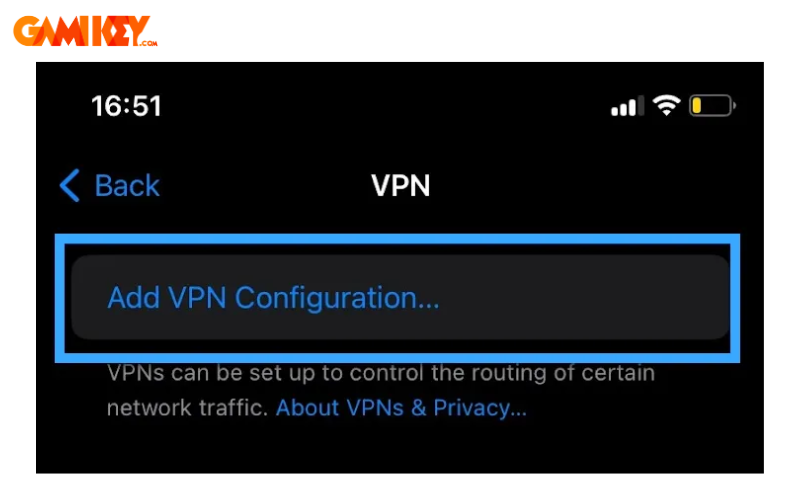
Step 4: Enter the server address, username, password, and tap “Done” to save and enable the new VPN connection.
iOS offers native support for various VPN protocols, making it versatile for both manual setups and app-based configurations. Apps from providers like ProtonVPN or Surfshark integrate well with iOS, offering one-tap connections and automatic server selection based on speed. This is crucial for iPhone users who frequently switch networks, as VPNs can protect against man-in-the-middle attacks on public hotspots. However, iOS’s strict app policies ensure higher security, but you should still verify the provider’s privacy policy. For advanced users, configuring IKEv2 provides a balance of speed and security, ideal for mobile data usage without excessive battery consumption.
Alternative Ways to Mask IP Without a VPN
Beyond traditional VPNs, several alternatives exist for IP spoofing, each with unique advantages and drawbacks.
Proxy Services: Proxies serve as intermediaries, routing your traffic to hide your true IP. They’re simpler than VPNs but often suffer from slower speeds and inferior security, lacking full encryption.
Tor Network: The Onion Router (Tor) relies on a volunteer-operated network of nodes, layering encryption to anonymize your identity and location thoroughly. It excels in privacy but at the cost of significantly reduced connection speeds due to multiple hops.
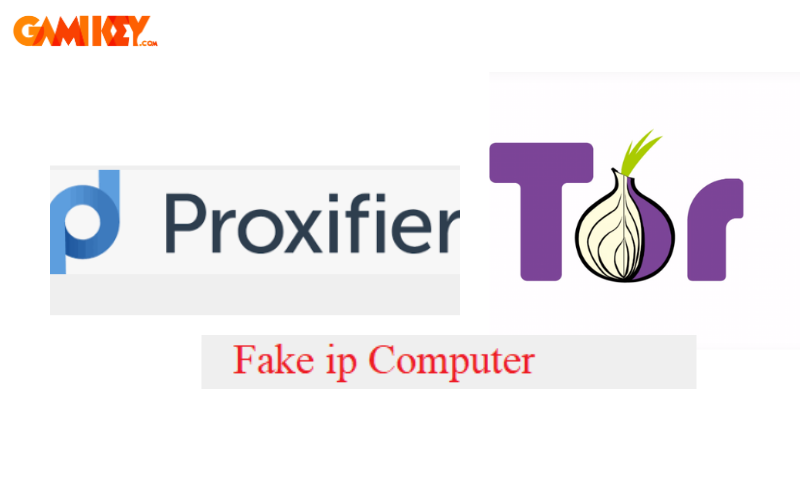
Other options include using SOCKS proxies for specific applications or browser-based tools like web proxies for casual browsing. However, these lack the comprehensive encryption of VPNs, making them vulnerable to interception. For users in restrictive environments, combining proxies with Tor can enhance anonymity, but this may further slow down your internet. Always weigh the trade-offs: while free proxies are tempting, they might log your data or inject ads, compromising privacy. In contrast, paid services offer better performance. Exploring these alternatives broadens your toolkit for how to change VPN equivalents, especially in scenarios where full VPN setup isn’t feasible.
Key Advantages of IP Masking
- Bypassing Geo-Restrictions: One major perk of IP spoofing is unlocking content tied to specific regions. Platforms like streaming services or websites often restrict access based on your location. By masking your IP, you can simulate being in another country, granting seamless access to global media and resources from anywhere.
- Enhancing Online Privacy: Employing an IP masking tool via VPN anonymizes your real address, replacing it with a fabricated one. This hinders trackers from monitoring your browsing habits, shielding personal data from advertisers, ISPs, and potential cybercriminals.
- Boosting Digital Security: Masking your IP adds a defensive layer against online threats. It obscures your actual location, making it tougher for hackers to target you with attacks like DDoS or surveillance, thereby fortifying your overall internet safety.
Delving further, IP masking can also facilitate secure remote access for businesses, allowing employees to connect to company networks safely from afar. In regions with heavy censorship, it empowers free information access, promoting digital freedom. Economically, it enables price comparison across regions for better deals on e-commerce. However, users should be aware of potential legal implications in some countries where VPN use is regulated. Overall, these benefits make how to change VPN a valuable skill for modern internet users seeking control over their digital footprint.
Troubleshooting When VPN Fails to Hide Location
If your VPN isn’t effectively concealing your position, consider these diagnostic and corrective measures:
- Verify IP Address: Use sites like IPLocation.net to check for leaks. If your real IP appears, the VPN might be malfunctioning or misconfigured.
- Review Location Tracking Permissions: Ensure no apps or sites have permission to track your location; revoke them if necessary to prevent overrides.
- Clear Browser Data: Eliminate cookies and browsing history, as these can reveal your true identity despite VPN use.
- Switch Servers: Connect to a different server, since some may be blacklisted or detected by sophisticated geo-blocking systems.
Additional tips include updating your VPN software, checking for DNS leaks with tools like dnsleaktest.com, or enabling obfuscated servers for evading VPN blocks. If issues persist, contact your provider’s support or switch to a more reliable service. Understanding these fixes ensures your how to change VPN efforts yield consistent results.
In this detailed exploration, we’ve covered essential aspects of how to change VPN to spoof IPs effectively. This practice not only secures your data but also opens doors to unrestricted online experiences. For more insights on VPNs and related software, visit the “Software” section on buyaitools.com!
>>> Discover additional VPN articles from buyaitools:
Purchasing ExpressVPN Accounts
Buying NordVPN Subscriptions
What is Turbo VPN?
Installing VPN on Windows 10
Top 5 Best VPN Services
Testing VPN Connections
To expand on the core topic of how to change VPN, let’s consider the broader implications and advanced techniques. Virtual Private Networks have evolved significantly since their inception in the 1990s, originally designed for secure corporate communications. Today, they serve millions for personal use, with the global VPN market projected to reach billions in value by 2025. Understanding how to change VPN involves not just the steps but also selecting the right protocol. For example, WireGuard offers superior speed compared to older options like PPTP, which is now considered insecure. When changing VPN servers, factors such as ping time and server load are critical for maintaining performance, especially for gaming or streaming high-definition content.
Privacy concerns drive much of the interest in how to change VPN. In an era where data breaches occur frequently, masking your IP prevents ISPs from throttling your connection based on usage patterns. For journalists or activists in oppressive regimes, this anonymity can be lifesaving. However, not all VPNs are created equal; free ones often monetize through ads or data selling, undermining the very privacy they promise. Investing in paid services with audited no-logs policies, like those from Mullvad or IVPN, ensures true protection.
From a technical standpoint, how to change VPN on routers extends protection to all connected devices, ideal for smart homes. This involves flashing firmware like DD-WRT and configuring VPN settings at the network level. For enterprises, site-to-site VPNs create secure tunnels between offices, but personal users might prefer client-to-site setups. Common pitfalls in how to change VPN include forgetting to enable the kill switch, leading to accidental exposure during disconnects.
Exploring real-world applications, travelers use VPNs to access home-country banking apps securely abroad. Shoppers leverage them for region-specific discounts, while researchers bypass paywalls on academic databases. Yet, challenges remain: some streaming giants like Netflix employ VPN detection, necessitating obfuscation features. Legally, while VPNs are legal in most places, their use for illegal activities isn’t protected.
To master how to change VPN, practice with multiple providers. Compare speeds using tools like Speedtest.net before and after connection. Monitor for leaks via browserleaks.com, and consider multi-hop VPNs for extra security layers. Integrating VPN with antivirus software creates a robust defense against malware. As cyber threats evolve, staying informed on updates like quantum-resistant encryption will keep your how to change VPN strategies future-proof.
In educational contexts, schools might block certain sites, making how to change VPN a tool for unrestricted learning. Parents use it to monitor family devices safely. The rise of mobile-first users has spurred app developments with intuitive interfaces, simplifying how to change VPN for beginners. However, over-reliance on VPNs can lead to complacency; always combine with strong passwords and two-factor authentication.
Economically, businesses save on international data roaming by routing through VPNs. Developers test geo-specific features without traveling. The environmental impact is minimal, but choosing energy-efficient servers contributes to sustainability. Community forums like Reddit’s r/VPN offer user experiences on how to change VPN effectively.
Ultimately, proficiency in how to change VPN empowers digital autonomy. Whether evading censorship, securing transactions, or simply browsing privately, this knowledge is invaluable in our connected world. Remember, ethical use is key; leverage it to enhance, not exploit, the internet ecosystem.