

If you’re seeking a premier resource for high-resolution, royalty-free visuals that stand out in creativity and professionalism, Adobe Stock deserves your attention. This comprehensive guide explores everything you need to know about this powerful platform, from its core features to practical applications in modern design workflows.
What is Adobe Stock?
Adobe Stock represents a sophisticated marketplace integrated directly into the Adobe Creative Cloud ecosystem, offering millions of curated photos, vectors, illustrations, videos, templates, and 3D assets. Developed by Adobe Inc., it serves as a professional-grade library designed to empower creators—whether graphic designers, marketers, content producers, or hobbyists—with premium visuals that can be licensed for both personal and commercial projects.
Unlike generic free image sites, Adobe Stock combines a vast selection of royalty-free content with advanced search capabilities and seamless integration across Adobe’s flagship applications. Users can discover assets by entering keywords, browsing curated collections, or exploring visual similarities, making it an indispensable tool for efficient creative production.
Key Advantages of Using Adobe Stock
Beyond basic access to images, Adobe Stock delivers tangible benefits that streamline workflows and elevate creative output. Here are the most compelling reasons professionals rely on this platform.
Lightning-Fast and Intelligent Search Functionality
The search engine powering Adobe Stock employs advanced AI and machine learning algorithms to deliver precise results instantly. As you type a query, predictive suggestions and related keywords appear, refining your search in real time. Filters for orientation, color palette, composition, and even visual similarity allow creators to pinpoint the perfect asset within seconds, dramatically reducing time spent browsing.
This intelligent system understands context, offering aesthetically similar options or complementary visuals that align with your project’s tone—whether you’re designing a corporate presentation, social media campaign, or editorial layout.
Extensive Library of Premium, Curated Content
Adobe Stock boasts over 300 million assets (as of late 2025), including photographs, vector graphics, high-definition videos, editorial images, and premium templates. A dedicated free collection provides thousands of no-cost assets suitable for commercial use, while the full library features exclusive contributions from world-class photographers, illustrators, and videographers.
Every asset undergoes rigorous curation for technical quality, compositional excellence, and legal compliance, ensuring reliability for professional applications ranging from print advertising to digital experiences.
Broad Range of Trending and Niche Categories
The platform organizes content into intuitive categories that reflect current design trends and timeless themes. Popular sections include nature and landscapes, business and finance, technology, health and wellness, diversity and inclusion, food and beverage, travel destinations, architecture, abstract concepts, and seasonal collections.
Editorial coverage extends to news-worthy events, celebrity portraits, and historical imagery, while specialized collections focus on sustainability, mental health, remote work, and emerging technologies like AI and metaverse visuals.
User-Friendly and Visually Inspiring Interface
Adobe Stock‘s clean, modern interface prioritizes visual discovery. Grid layouts showcase high-resolution previews, mood boards inspire thematic exploration, and curated galleries highlight trending aesthetics. The design encourages serendipitous finds—moments where an unexpected image sparks fresh creative direction.
Responsive across desktop, tablet, and mobile, the platform ensures a consistent experience regardless of device, making it ideal for on-the-go ideation.
Deep Integration with Adobe Creative Cloud Tools
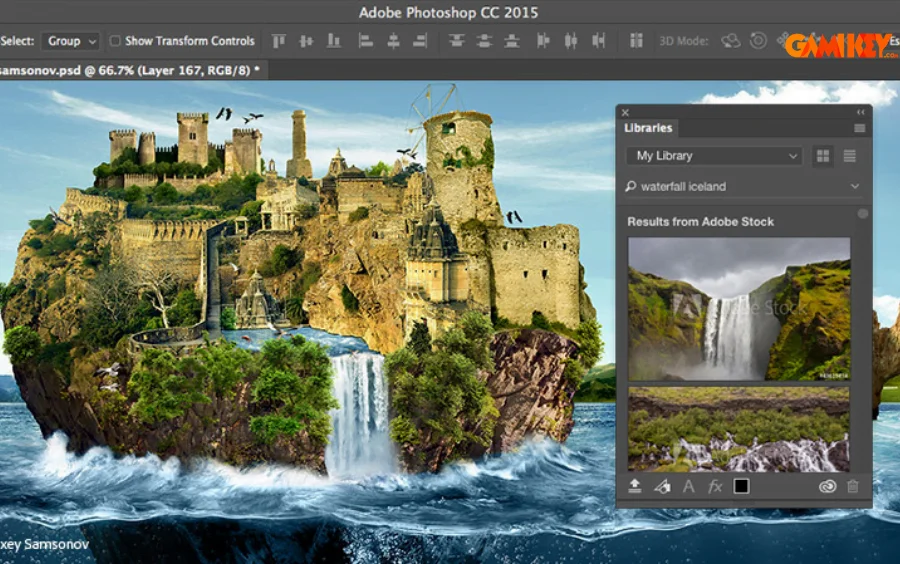
One of Adobe Stock‘s most powerful features is its native integration with applications like Photoshop, Illustrator, InDesign, Premiere Pro, After Effects, and XD. Creators can search, preview (with watermark), and license assets without leaving their workspace.
Once licensed, the full-resolution file replaces the watermarked preview automatically. Assets sync to Creative Cloud Libraries for multi-project access across devices, enabling seamless collaboration and version control in team environments.
How Adobe Stock Stands Apart from Other Free Image Libraries
While platforms like Unsplash, Pexels, or Pixabay offer generous free collections, Adobe Stock differentiates itself through compensated contributor models. Adobe pays artists fairly for assets included in the free collection—ensuring ethical practices and encouraging higher-quality submissions.
Additionally, the platform’s enterprise-grade licensing, AI-enhanced search, and Creative Cloud integration provide workflow advantages unavailable in purely community-driven sites. For professionals requiring guaranteed commercial safety and editorial accuracy, these distinctions prove invaluable.
Mastering Templates and Assets on Adobe Stock
Adobe Stock extends beyond static images to include thousands of customizable templates for social media graphics, presentations, flyers, resumes, and marketing collateral.
Understanding Licensing Options
Adobe Stock offers clear, perpetual, royalty-free licenses. The Standard License covers most digital and print uses, while Enhanced and Extended licenses accommodate larger audiences, products for resale, or broadcast applications. Free assets carry the same commercial rights as paid ones within the free collection terms.
All licenses are worldwide and indefinite, providing peace of mind for long-term projects.
Launching Projects with Professional Templates
In any Creative Cloud app, navigate to File > New and browse Adobe Stock templates directly. Select a design, preview it in context, and license it instantly. Templates arrive fully editable—layers organized, fonts linked, and colors themed for rapid customization.
Choosing Between Free and Premium Assets
The free collection offers robust starting points, but premium templates often include more sophisticated layouts, animations, or video elements. Subscription plans provide monthly asset credits at reduced rates, while pay-as-you-go options suit occasional users.
Customizing Templates to Match Your Vision
Once opened, replace placeholder text, swap colors via global swatches, adjust layouts, and incorporate your brand assets. Advanced users can animate elements in After Effects or add interactivity in XD.
Incorporating Personal Photography or Graphics
Drag your own images onto placeholder frames, or use the Layers panel to insert content precisely. Smart masking and auto-adjustment tools ensure seamless blending with the template’s style.
Saving, Exporting, and Preparing for Print or Digital Delivery
Save versions iteratively in Creative Cloud for easy reversion. Export final designs as PDF/X for print fidelity, PNG for web transparency, or MP4 for video. Include bleed and crop marks when preparing print-ready files.
In summary, Adobe Stock transforms how creators source and implement visuals, combining unparalleled quality, ethical compensation, and workflow efficiency. Whether building a brand identity, crafting marketing campaigns, or exploring personal projects, this platform continues to set the industry standard for professional stock content.