

In the ever-evolving landscape of computing, one platform has consistently dominated the global market, powering billions of devices worldwide. That platform is the Windows operating system, a cornerstone of modern personal computing developed by Microsoft. This comprehensive guide delves deeply into its origins, unique characteristics, comparative advantages, interface evolution, strengths and weaknesses, and a detailed chronicle of its versions, providing an expert-level understanding for enthusiasts, professionals, and everyday users alike.
Understanding the Windows Operating System: Origins and Evolutionary Journey
The Windows operating system stands as Microsoft’s flagship product, renowned for its intuitive graphical user interface (GUI) that revolutionized personal computing. Launched initially in 1985, it transformed clunky command-line interactions into visually engaging experiences through overlapping rectangular “windows” – hence the name – allowing users to multitask effortlessly across applications.
From its humble beginnings as an extension atop MS-DOS, Windows has undergone remarkable transformations. Early iterations focused on basic graphical overlays, but subsequent releases introduced groundbreaking features like multitasking, plug-and-play hardware support, and seamless internet integration. Iconic milestones include the revolutionary Start menu in 1995, enhanced stability in the early 2000s, and modern Fluent Design principles in recent years. This continuous innovation has cemented Windows’ position as the preferred choice for diverse users, from home enthusiasts to enterprise environments, due to its robust ecosystem and unparalleled software compatibility.
The name “Windows” cleverly reflects its core philosophy: presenting information in resizable, movable frames that mimic real-world windows, fostering intuitive navigation and productivity. Over decades, Microsoft has refined this concept, incorporating user feedback to balance familiarity with cutting-edge advancements, ensuring the Windows operating system remains relevant in an era dominated by mobile and cloud computing.

Comparative Analysis: Windows Operating System Versus macOS and Linux
Key Strengths of the Windows Operating System
The Windows operating system commands the largest market share globally, installed on the vast majority of personal computers. Its dominance stems from exceptional hardware versatility, effortlessly running on devices from leading manufacturers such as Dell, Lenovo, HP, ASUS, and Acer. This broad compatibility extends to peripherals and drivers, minimizing setup frustrations.
- Seamless installation processes and optimized performance across diverse configurations make it ideal for both novices and power users.
- Licensing options are accessible, with genuine activations providing full access to updates, security patches, and support services.
- Unmatched software library: Virtually every application, from productivity suites to professional tools, has native Windows versions that perform optimally.
- Built-in backup and recovery tools, including System Restore and File History, offer reliable data protection without third-party dependencies.
- Integrated features like Windows Hello for biometric login and BitLocker for encryption enhance everyday security and convenience.
Distinctive Features of macOS
Developed exclusively by Apple, macOS powers the company’s premium hardware lineup, including MacBook, iMac, and Mac Studio devices. Debuting in 1984 as the original Macintosh OS, it emphasizes seamless integration within Apple’s walled garden ecosystem.
- Pre-installed on all Apple computers, ensuring perfect hardware-software synergy and minimal configuration needs.
- Major updates are provided free of charge, contrasting with paid upgrades in some competing platforms historically.
- Tightly knit ecosystem enables fluid continuity across iPhone, iPad, and Mac via features like Handoff, AirDrop, and Universal Clipboard.
- Robust built-in applications for creativity (e.g., Final Cut Pro optimization) and productivity, supplemented by automatic Time Machine backups.
- Renowned for stability and longevity, with older devices often receiving extended support compared to industry averages.
Unique Aspects of Linux Distributions
Linux represents an open-source paradigm, originating from Linus Torvalds’ kernel in 1991. Its community-driven nature has spawned numerous distributions (distros) tailored to specific needs, such as Ubuntu for beginners, Fedora for cutting-edge features, and Linux Mint for Windows-like familiarity.
- Completely free and modifiable, allowing users to customize the kernel, desktop environment, and packages extensively.
- Exceptional security through permission-based architecture and rapid community patching of vulnerabilities.
- Lightweight variants that revive older hardware, extending device lifespan significantly.
- Server dominance: Powers most web servers, supercomputers, and cloud infrastructure due to stability and efficiency.
- Advanced package management systems (e.g., apt, dnf) streamline software installation from vast repositories.
- Complex backup strategies often involve command-line tools like rsync or dd, appealing to technically proficient users.
Evolution of the Windows User Interface
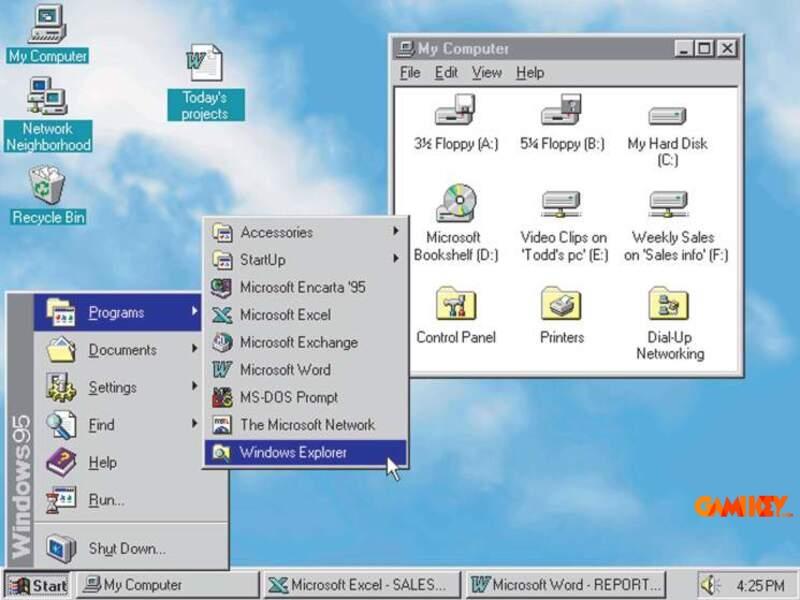
Early Windows versions relied on rudimentary tiled windows and basic menus, a significant leap from pure text-based DOS prompts. Progressive enhancements introduced iconic elements: the taskbar, desktop icons, and context menus that persist today.
The pinnacle of modern design arrived with Windows 11 in October 2021, featuring centered taskbar alignment, rounded corners, snap layouts for multitasking, and Mica transparency effects. Widgets panel, redesigned Microsoft Store, and native Android app support via Windows Subsystem for Android exemplify Microsoft’s commitment to hybrid work and entertainment.
While demanding higher specifications (e.g., TPM 2.0, Secure Boot), Windows 11 optimizes resource allocation for superior performance on compatible hardware, including direct integration with Microsoft Teams and advanced gaming technologies like Auto HDR.
Advantages and Drawbacks of the Windows Operating System
Outstanding Benefits of Choosing Windows
- Global ubiquity ensures extensive community support, tutorials, and troubleshooting resources readily available.
- Premier gaming platform: DirectX exclusivity, Xbox integration, and vast Steam library compatibility deliver unmatched experiences.
- Enterprise-grade tools like Active Directory, Group Policy, and Hyper-V virtualization cater to business scalability.
- Touch and pen support since Windows 8, evolving into sophisticated inking and gesture recognition in Surface devices.
- Regular feature updates introduce innovations like Windows Copilot AI assistance in recent builds.
- Backward compatibility preserves legacy software functionality through modes like Windows XP emulation.
Potential Limitations to Consider
- Security challenges: High popularity attracts malware; mitigation requires vigilant practices, Windows Defender, and timely updates.
- Piracy prevalence: Unauthorized copies expose users to risks including embedded threats and lack of official support.
- Resource intensity in newer versions may strain older hardware, necessitating upgrades for optimal experience.
- Occasional bloatware from OEM installations, though clean installs alleviate this issue.
Comprehensive Timeline of Windows Operating System Releases
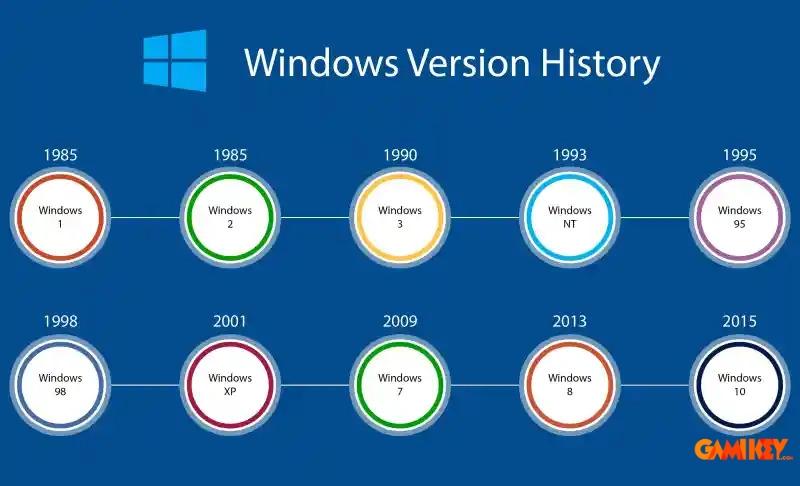
| Release Year | Version | Major Improvements | Notable New Features |
|---|---|---|---|
| 1985 | Windows 1.0 | Introduction of graphical user interface overlay on MS-DOS | Tiled windows, basic applications like Calculator and Paint |
| 1987 | Windows 2.0 | Overlapping windows and improved memory management | Support for VGA graphics and early multitasking |
| 1990 | Windows 3.0 | Enhanced mode for better performance and virtual memory | Program Manager, File Manager, and improved icons |
| 1992 | Windows 3.1 | Stability fixes and TrueType fonts | Multimedia support and Minesweeper game |
| 1995 | Windows 95 | 32-bit architecture with preemptive multitasking | Start menu, taskbar, Plug and Play, Internet Explorer |
| 1998 | Windows 98 | Better hardware support and system utilities | USB drivers, FAT32 filesystem, Internet Connection Sharing |
| 1999 | Windows 98 SE | Bug fixes and enhanced internet tools | Improved drivers and Internet Explorer 5 |
| 2000 | Windows ME | Consumer-focused multimedia enhancements | System Restore, Movie Maker, but criticized for instability |
| 2001 | Windows XP | NT kernel stability with consumer-friendly interface | Luna theme, Remote Desktop, Fast User Switching, ClearType |
| 2006 | Windows Vista | Aero glass interface and security overhaul | Sidebar gadgets, User Account Control, BitLocker |
| 2009 | Windows 7 | Refined performance and touch capabilities | Aero Snap, Libraries, Jump Lists, HomeGroup |
| 2012 | Windows 8 | Metro (Modern) UI for touch devices | Start Screen, Windows Store, integrated Charms bar |
| 2013 | Windows 8.1 | Refinements addressing user feedback | Return of Start button, boot to desktop, deeper SkyDrive |
| 2015 | Windows 10 | Hybrid Start menu and universal apps | Cortana assistant, Edge browser, Virtual Desktops, Continuum |
| 2021 | Windows 11 | Modernized design with productivity focus | Centered taskbar, Snap Layouts, Widgets, Android apps, enhanced gaming |
| Ongoing | Windows 11 Updates (24H2+) | AI integration and security enhancements | Copilot+, Recall (controversial), improved ARM support |
This in-depth exploration highlights why the Windows operating system continues to thrive amid competition. Its blend of accessibility, power, and adaptability serves billions effectively. For further insights into related technologies and software optimizations, explore additional resources on computing platforms.
>> Discover more expert articles on Windows features and tools:
Desktop Window Manager Explained
Understanding Windows Explorer
What is the Windows.old Folder?
Windows Defender Overview
Windows Media Player Guide